How to Recover Data from a Corrupted XFS Partition Without Making It Worse
-
 Written By Shikha Khanna
 Approved By Soumyadeep Sarkar
-
 Updated on September 30, 2026
 -
 Min Reading 10 Min
 - Share

Summary: XFS does not fail the way ext4 or other Linux filesystems do. Its metadata lives apart from the actual file data, organised into allocation groups and B+ tree structures, which is why a corrupted partition can still contain intact, recoverable files beneath the damage. Journal replay comes first, because it repairs the filesystem’s internal bookkeeping without touching a single data block. xfs_repair comes next, but only after the log is clean, since running it too early, or on failing hardware, risks erasing exactly the data an administrator is trying to save. Once both tools reach their limits, recovery moves below the filesystem entirely, into inode-level analysis with xfs_db and sector-by-sector file carving.
Most administrators respond to a corrupted XFS partition with the same reflex, running the first command that promises to restore the filesystem to a mountable state. That approach carries considerable risk and runs counter to what a sound XFS data recovery strategy requires. XFS separates file data from the metadata that tracks it, and a corrupted partition frequently retains every byte of the original data intact on the platter. The outcome depends less on the severity of the error message and more on the sequence of commands used to address it. That sequence begins with journal replay, followed by xfs_repair, or, alternatively, a less appropriate option.
The sections that follow set out what to verify before running a repair tool, the difference in risk between journal replay and xfs_repair, and where xfs_db and sector-level carving apply once standard tools reach their limit.
How Does XFS Architecture Affect Data Recovery After Corruption?
XFS handles data storage differently from the ext family of filesystems, and three of these differences determine what remains recoverable after corruption: allocation groups, B+tree metadata tracking, and metadata-only journaling.
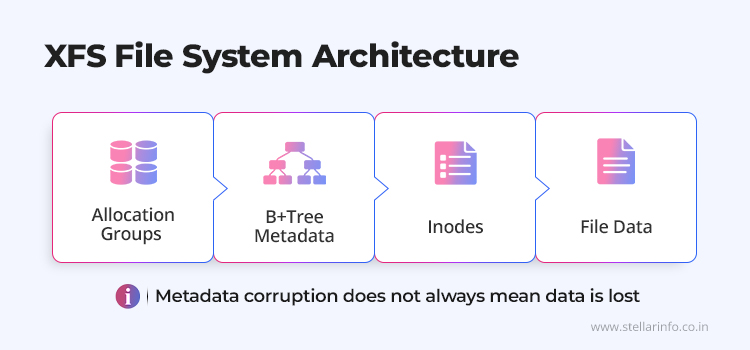
- Allocation groups contain corruption to a specific region of the disk rather than letting it spread.
- B+tree metadata tracking creates a single path to each file, which becomes a single point of failure if that path breaks.
- Metadata-only journaling can leave a file with the correct name and size but no actual content after a crash.
Each mechanism is explained in more detail below.
How Allocation Groups Contain Corruption to Specific Disk Regions
XFS divides a partition into equally sized virtual regions called allocation groups (AGs).
✅ Why This Helps Recovery
- Each AG functions as a semi-independent sub-filesystem, maintaining its own copy of the superblock, free-space tracking, and inode management.
- Multiple CPU threads can allocate and free blocks in different AGs simultaneously, which improves performance compared with a single shared structure.
- For XFS data recovery, this design keeps corruption contained, because a damaged metadata structure in one AG does not necessarily spread to the rest of the filesystem.
- Experts can use tools to scan AGs in parallel, which significantly reduces processing time on large volumes compared with the linear scans that ext4 requires.
- Each AG also keeps a redundant copy of the superblock. If the primary superblock at block zero is destroyed, tools such as xfs_repair or xfs_db can locate a secondary copy from another AG and reconstruct the filesystem’s geometry.
How B+Tree Metadata Structures Create Single-Point-of-Failure Risks
Where ext4 uses bitmaps to track free space and inode allocation, XFS stores nearly every piece of internal metadata in B+tree structures.
A B+tree organises data hierarchically, with root nodes pointing to intermediate nodes, which in turn point to leaf nodes that contain the actual records. That structure makes XFS efficient for large-scale lookups, but the efficiency comes at a cost, since locating a file requires traversing the tree from the root to the leaf.
🚨 One Broken Node, One Lost Branch
If a single intermediate node becomes corrupted, the entire branch below it becomes unreachable. Thousands of files may be structurally intact on disk, with their data blocks untouched, yet the path to finding them through normal filesystem operations no longer exists.
Bitmap-based corruption in ext4 behaves differently, because damage to a bitmap block affects tracking of a known, bounded region, rather than severing access to an entire metadata branch.
How Metadata-Only Journaling Causes Null-Byte Files After a Crash
XFS journals only metadata changes, not actual file contents. It also uses a technique called delayed allocation, which keeps data in memory and writes it to disk in large, contiguous batches for performance.
⚠️ The Null-Byte Problem
- During a crash, the journal may contain a fully committed metadata transaction recording that a file exists, has a specific size, and occupies certain disk blocks.
- If the actual data has not yet been flushed from memory to those blocks, journal replay still faithfully restores the metadata.
- The file appears to have the correct name and size, but its contents are binary zeros, structurally valid yet functionally empty.
- Filesystems that journal both metadata and data, such as ext4 in full journalling mode, do not encounter this problem.
What Is XFS Journal Replay and Why Must It Happen Before Repair?
XFS journal replay is the write-ahead logging mechanism that restores metadata consistency after a crash or power failure, and it must run before any repair tool touches the filesystem. Understanding how this mechanism operates, and when it can break down, determines if XFS partition recovery preserves recent changes or discards them permanently.
What the XFS Journal Records and How the Kernel Replays It
The XFS journal is a circular buffer, stored either in a dedicated section of the partition or on an external device. Every metadata operation is recorded to this buffer before the change is applied to its final on-disk location. This write-ahead sequence ensures that if a crash interrupts the process, the journal has a record of what was in progress.
After an unclean shutdown, the XFS kernel driver reads the journal automatically during the mount process. The driver identifies metadata changes that were fully written to the log before the crash and applies each one to its permanent on-disk location. Partially written transactions, where the crash interrupted an in-progress log write, are discarded. Because replay processes only the pending journal entries rather than scanning the entire volume, recovery speed remains fast regardless of the filesystem’s total size.
Why xfs_repair Requires a Clean Log Before It Can Run
⚠️ xfs_repair Halts on a Dirty Log
xfs_repair cannot operate on a filesystem with an unreplayed journal. If the log is dirty, the tool halts immediately and instructs the administrator to mount the filesystem first, so the kernel can process the pending journal entries before repair begins.
This dependency exists for a technical reason. The journal contains the most recent valid state of the metadata. Running xfs_repair without replaying the log is risky, because it would mean repairing against outdated metadata. The result would be a filesystem that is internally consistent but missing all metadata changes recorded in the log, potentially leaving files created or modified moments before the crash orphaned.
✅ The Standard Procedure
- Mount the filesystem, which triggers the kernel’s automatic journal replay.
- Unmount it cleanly once replay finishes.
Only after the log is clean should xfs_repair run, since it needs metadata that reflects the most current on-disk state available.
What Happens When Journal Replay Fails, and the Log Cannot Be Cleared
Journal replay is not always possible. If the mount attempt fails with the error “Structure needs cleaning” (EUCLEAN), the journal may be physically damaged. Possible causes include bad sectors in the log region, corrupted transaction headers, or structural inconsistencies that prevent the kernel from safely parsing the log.
🚨 The Cost of Forcing a Log Zero
At this point, administrators face a decision. The xfs_repair -L flag forces log zeroing. It overwrites the entire journal with zeros and discards all pending metadata transactions. This clears the dirty log and allows xfs_repair to proceed, but at the cost of every change the journal was keeping. Files created or extended immediately before the crash may vanish, and directory updates may be lost. The filesystem reverts to the state it was in before those journal entries were written.
What Does xfs_repair Do and When Does It Affect Data Recoverability?
xfs_repair restores a corrupted XFS partition to a mountable, internally consistent state, but used without preparation, it can permanently erase data that a slower approach would have preserved.
How xfs_repair Scans and Rebuilds XFS Metadata in Seven Phases
xfs_repair operates exclusively on unmounted filesystems and executes a seven-phase scan of the entire partition.
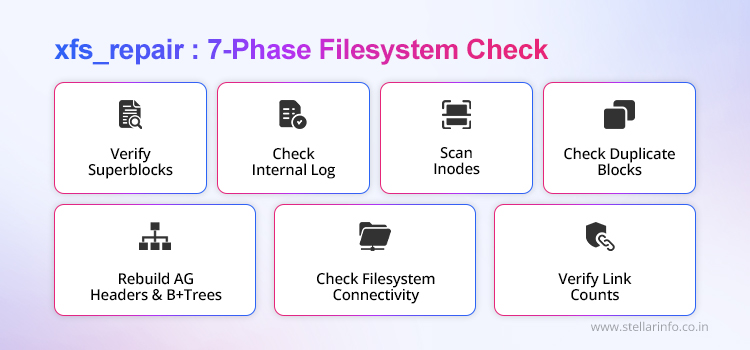
The Seven Phases
- Verifies the primary superblock and locates valid AG superblock copies if the primary is damaged.
- Examines the internal log and clears it once it is confirmed clean.
- Scans every allocation group to discover and validate inodes.
- Checks for duplicate block claims, meaning situations where multiple inodes reference the same physical data blocks.
- Rebuilds AG headers and the B+trees that manage free space and inode allocation.
- Performs connectivity checks to confirm every valid inode links to a directory entry, and moves inodes that are in use but disconnected from any directory into a lost+found directory, named by their inode number.
- Verifies and corrects link counts throughout the filesystem.
✅ Always Run the Dry Run First
The dry-run mode, xfs_repair -n, executes this entire scan without writing any changes to disk. It reports the inconsistencies the tool finds and the corrections it would apply, giving administrators a clear picture of the damage before they commit to a permanent repair. Running the dry run first is a prerequisite for any XFS-corrupted filesystem data recovery workflow.
How xfs_repair Restores Mountability and Recovers Orphaned Files
The tool’s primary contribution to recovering data from an XFS partition is restoring mountability. A filesystem with damaged B+tree structures, corrupted AG headers, or inconsistent inode maps cannot be mounted or accessed through normal operations. xfs_repair rebuilds these structures, which makes the partition accessible again.
How xfs_repair Causes Further Data Loss on Failing or Unstable Hardware
xfs_repair is a risky utility from a data-recovery standpoint because it prioritises internal consistency over data preservation. When it encounters a metadata structure it cannot fix, it does not leave the structure in place for manual analysis. It clears it instead. This behaviour is called metadata zapping, and it converts a corrupted inode or directory into a zeroed-out, free structure. The B+ tree pointers that once pointed to the file’s data blocks have been erased. If those pointers were the only path to the data, as they often are in XFS, then the data could not be accessed with any standard tool. A specialist with access to a pre-repair disk image might still locate the data blocks through manual carving, but without that image, the opportunity is gone.
⚠️ The Risk Compounds on Failing Hardware
The risk of xfs_repair compounds on failing hardware. The tool performs intensive, sequential read and write operations over the full partition. On a drive with bad sectors, degraded heads, or an unstable controller, this I/O load can accelerate physical deterioration.
What Techniques Do Data Recovery Professionals Use on Corrupted XFS Partitions?
Professional engineers turn to techniques that operate below the XFS filesystem layer, such as direct inode analysis with xfs_db and sector-level file carving, once journal replay and xfs_repair have reached their limits.
How Engineers Extract Data from Deleted Inodes Using xfs_db
✅ XFS Retains More Than Most Filesystems After Deletion
XFS retains more recoverable metadata after deletion than most Linux filesystems. When a file is deleted, the inode is marked unallocated, and the file size field is set to zero. However, the extent structures, the maps that record which physical disk blocks stored the file’s data, remain intact within the inode.
Professional engineers use xfs_db, the low-level XFS debugger, to navigate directly to specific inodes on the disk image. They examine the raw hexadecimal structure of a deleted inode to identify the original block addresses where the file’s data resided. They then extract those blocks directly using dd.
XFS directory structures also retain partial inode references after deletion. This residue allows engineers to reconnect deleted filenames to their original metadata and data blocks.
For handover to specialist support, engineers can also generate a compact, obfuscated copy of the filesystem metadata with xfs_metadump, which preserves the structures needed for diagnosis without exposing the underlying file content.
How Sector-Level File Carving Recovers Data Without Filesystem Metadata
When metadata corruption is too severe for any filesystem-aware tool to traverse, experts use a technique called signature-based file carving. Carving tools scan the raw disk image sector by sector and identify files by their internal format signatures, such as JPEG headers, PDF markers, and database page structures, rather than relying on filesystem metadata. This technique allows experts to recover file contents without original filenames or directory structures.
Why Stellar Is Equipped to Recover Data from XFS Partitions That Standard Tools Cannot Fix
In many cases, XFS filesystems become corrupted so severely that command-line utilities cannot help with XFS filesystem data recovery.
Stellar Data Recovery has recovered data from XFS partitions in enterprise RAID configurations, standalone server drives, and NAS devices from manufacturers including Synology and Buffalo. Our engineers work from sector-level disk images in ISO-certified facilities, using proprietary tools developed by our in-house R&D team to extract data from scenarios where xfs_repair and xfs_db reach their limits.
Every XFS data recovery engagement at Stellar begins with a free evaluation, in which an expert helps identify the failure type, assess the data at risk, and outline the rxecovery path. Call 1800 102 3232 for a free consultation on XFS corrupted filesystem data recovery.
If you’re dealing with filesystem corruption or storage-related data loss, these related Stellar guides can help you understand the issue and explore the available recovery options:
- ReFS Data Recovery: Microsoft’s Resilient File System — Is It Actually Resilient
- Btrfs Data Recovery: Recovering Files from a Corrupted Btrfs Volume
- Encrypted Drive Data Recovery: BitLocker, VeraCrypt, and FileVault Guide
- GPT vs MBR Partition Recovery and Why the Recovery Process Differs
- SLC vs MLC vs TLC vs QLC NAND in SSDs: How Cell Type Affects Data Recovery
Frequently Asked Questions
1. Does XFS Corruption Always Mean the Data Is Lost?
Not in most cases. XFS stores file data and metadata in separate structures. Metadata corruption prevents the filesystem from locating files through normal operations, but the underlying data blocks usually remain intact on disk, which is what makes XFS data recovery possible.
2. Is It Safe to Run xfs_repair on a Drive That Has Bad Sectors?
Running xfs_repair on physically failing hardware is risky because the tool performs heavy, continuous read and write operations across the entire disk. Data recovery experts always create a disk image first, then run xfs_repair on the copy, never on the original drive.
3. Can a Reformatted XFS Partition Be Recovered?
XFS allocates inodes dynamically rather than fixing them at format time. When a partition is reformatted, the new filesystem overwrites only the minimal inode structures it needs immediately. The old inode metadata still survives, which makes partial recovery possible if no new data has been written.
4. What Does Structure Needs Cleaning Mean on an XFS Partition?
Structure needs cleaning, or EUCLEAN, is the error the kernel returns when it cannot mount an XFS partition because the journal or metadata is too damaged for automatic replay to complete. It usually means the log needs manual attention, most often through xfs_repair -L, before the filesystem becomes mountable again.
5. Is It Safe to Run xfs_repair -L?
Running xfs_repair on physically failing hardware is risky because the tool performs heavy, continuous read and write operations across the entire disk. Data recovery experts always create a disk image first and then run xfs_repair against the copy, never against the original drive.
About The Author