
Broken Phone Data Recovery: Can You Recover Data From a Dead Mobile?
-
 Written By Urvika Tuteja
 Approved By Nivedita Jha
-
 Updated on March 9, 2026
 -
 Min Reading 6 Min
 - Share

If you’re staring at a broken or dead phone, it almost feels like your life got locked away—photos, videos, WhatsApp media, kids’ moments, trip memories, work screenshots… everything.
Every day, people reach out to us at Stellar asking whether broken phone data recovery is even possible or if their precious photos and memories are lost forever.
Let’s set your expectations right at the start: a “dead” phone doesn’t mean permanent data loss.
In many cases, you can get your files back even from a phone that seems completely gone. In this guide, we will walk you through the right way to think about recovery.
We will start with the cases that are easiest (but overlooked) and then explain how data recovery is still possible even in cases of badly damaged phones.
Easy Ways to Recover Data From a Broken/Dead Phone
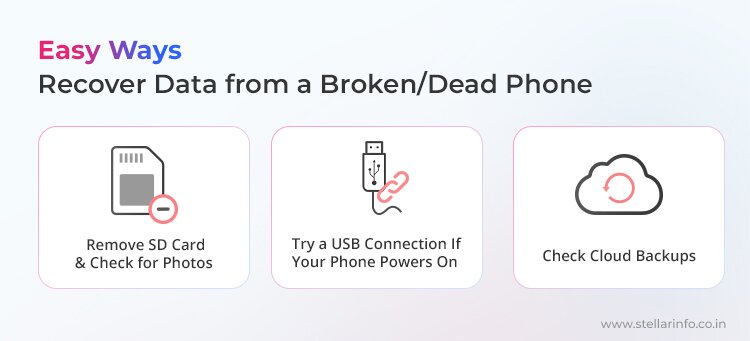
1. Remove the SD Card and Check for Photos
If your phone has a removable microSD card, this is the first thing to try.
- Power off the phone (if possible) and remove the SD card.
- Insert it into another phone or a computer using a card reader.
Often, your photos, videos, and other files might be saved here by default.
Physical damage to the SD card is a different story, though, and in that case, you will need the assistance of a professional SD Card Recovery Service.
2. Try a USB Connection If Your Phone Powers On
Even if your screen is cracked or nonfunctional, your phone might still start up in the background.
- Plug your device into a computer using a USB cable.
- If your device is detected, you may be able to copy files directly.
For some lucky users, this is all it takes to recover photos from broken phone storage.
3. Check Cloud Backups
Many people are surprised (and relieved) to discover their photos, contacts, or WhatsApp messages have been backed up to the cloud.
- Check your Google account (Android) or iCloud (iPhone).
- Sign in from another device and look for synced photos, contacts, or files.
If your data was synced to the cloud before your phone “died,” you will be able to restore everything to a new device in minutes.
If none of these simple solutions work for you, read on. But first, let’s understand the recovery scenarios involving the two “types” of dead phones.
Is Your Phone Powering On or Not?
From a data recovery perspective, your “dead” device will fall into one of two categories:
- Phones that still power on, but you can’t use the screen or interface.
- Phones that don’t power on at all, or only do so briefly and unreliably.
This difference is technically significant.
If your phone powers up, even if the screen is gone or nothing is visible, your chances of recovering your data are much higher. Why? Because most modern phones load their encryption keys and storage system during the boot process. If your device can do that, even for a few seconds, the chances of successful recovery at a professional Android/iPhone Data Recovery Service are very high.
But if the phone won’t power up at all, recovery becomes a technical challenge that requires high-level expertise.
Category 1: Phone Has Power, but You Can’t Access Your Data
This is a very common situation. You might be in this category if any of the following are true for your phone.
- The screen is shattered, black, or flickering.
- Touch is not working.
- The phone is stuck on the logo or frozen.
- The phone vibrates, rings, or shows charging signs.
- You can tell it is “on,” but you can’t operate it.
The real problem here isn’t data loss; it’s that you’ve lost the usual way to interact with the phone. So the right approach is to focus on restoring access, not “repairing the phone.”
How Data Recovery Professionals Recover Data in These Cases
At Stellar Data Recovery, the first objective in broken phone data recovery cases like these is to create a short, safe window of access that is long enough for a technician to extract your data. Sometimes we’ll temporarily attach a new screen or use specialist equipment to interact with the phone’s input system.
For some devices, we can enable alternate input methods or use special cables to “talk” to the phone even when the touch screen is dead.
Our goal is to boot the device, unlock it, and extract your data. The success rate in these cases is very high.
But what if your phone doesn’t power on at all, or won’t stay on long enough for any of this? Let’s look at those tougher cases next.
Category 2: Phone Does Not Power On or Stay On (Actual “Dead Phone” Cases)
If your phone does not boot at all, or it turns on and immediately turns off, then data recovery becomes a bit more challenging. The data recovery steps required are performed at the hardware level, and careless attempts can permanently reduce recovery chances.
But even here, not all “dead” phones are the same. Professionally, we split this into two subcategories.
- Power and Charging Path Failures
- Motherboard and CPU Failures
A. Power & Charging Failures
Sometimes, a phone “dies” because of battery or charging circuit issues. In such cases, you might notice symptoms like:
- The phone shows no response when charging.
- A charging icon appears, but the phone never boots.
- The phone turns on briefly and shuts down.
In these cases, the underlying problem is with the battery, the charging IC (integrated circuit), or the PMIC (power management integrated circuit).
Note: If your phone uses a removable battery, replace it and see if it turns on. In most modern smartphones, though, the battery is not removable.
Smartphones rely on a tightly controlled power system. This means that even a small failure can prevent the phone from staying on long enough to unlock storage.
Common technical causes are:
- Battery failure or internal short circuit
- Charging IC damage
- Power Management IC (PMIC) failure
In these cases, the processor and storage are still intact, but the phone cannot maintain stable voltage long enough to complete the boot process and load encryption keys.
This distinction is critical. Your data is not “gone.” The phone simply cannot stay alive long enough to access it.
Why DIY Attempts Are Dangerous Here
This is the point where many people unintentionally make recovery harder.
Actions like repeatedly plugging in different chargers, attempting “jump start” battery tricks, opening the phone without proper isolation, or powering a shorted board can permanently damage components that were still recoverable.
This is why, at this stage, DIY recovery is not only unrealistic but downright dangerous.
How We Recover Data From Dead Phones With Power Issues
In professional data recovery for phones with power issues, our goal is to create a temporary, stable operating window long enough for us to extract the data.
This typically means that our technicians:
- diagnose faulty power rails using forensic-grade tools;
- isolate shorted or failing components;
- stabilize power delivery long enough to boot; and
- access encrypted storage while the phone is alive.
If the phone can be powered safely (even briefly), data extraction becomes possible because the phone itself decrypts the storage using its hardware-bound keys.
When this succeeds, recovery rates are high.
B. CPU- and Motherboard-Related Failures
In some cases, you will observe one or more of the following symptoms.
- You plug the phone charger in, but the screen shows no charging symbol.
- The phone immediately overheats when power is applied.
- The phone does not make an attempt to boot even with the charger plugged in.
Or maybe your phone suffered a major drop or liquid spill, or suddenly shut down after overheating and never came back on.
In these cases, the problem is no longer limited to the battery or charging path. The failure is linked to critical components on the motherboard itself, including the processor (CPU).
This, on its own, means that even though the data is intact in the storage, it is not readable because it is encrypted, but the encrypted keys (generated and protected by the phone’s CPU) can’t function.
This is why removing the memory chip alone does not solve the problem.
How We Recover Data From Dead Phones With Motherboard Issues
Our data recovery technicians use specialist lab procedures to recover data from dead phones with motherboard issues. Here are some of these methods.
- JTAG data recovery, where we solder tiny wires to specific test points on the motherboard, using a special interface to “talk” to the phone’s memory chips directly.
- Chip-off data recovery, where we physically remove the storage chip from the phone’s board in a cleanroom environment, then read with advanced hardware.
These techniques are non-destructive and highly advanced. And they’re used only when all safer recovery paths have failed.
Why Choose Stellar for Broken/Dead Phone Data Recovery
Our approach is built on diagnostic rigor and transparency. When you bring a device to Stellar for broken phone data recovery, we never take wild guesses or use risky shortcuts.
Instead, we:
- Assess the power and charging system, processor health, and encryption status using safe, non-destructive diagnostics.
- Restore just enough functionality (where possible) to safely access your files.
- Use advanced techniques like chip-off data recovery or JTAG data recovery only when absolutely necessary and when it’s technically feasible.
You deserve clarity and honesty in tough situations like this.
If you’re unsure, don’t try to fix a “dead” phone at home and contact Stellar Data Recovery.
That’s how you give yourself the best possible chance to get your precious photos and files back.
For more helpful guides on mobile data recovery, explore our related articles below and learn how to protect and restore your valuable data:
About The Author


Urvika Tuteja is an SEO Executive at Stellar® with a good understanding of online marketing. She is known for her quick and enthusiastic learning abilities. Urvika contributes her skills to managing operational activities and driving the growth of organic traffic.


