Pen Drive vs Flash Drive: What’s the Difference & How to Recover Data
-
Written By Urvika Tuteja

 Approved By Nivedita Jha
-
 Updated on July 23, 2026
 -
 Min Reading 7 Min
 - Share

Summary:
📌 The Difference: A pen drive is a type of flash drive. “Flash drive” is the broader category that includes SSDs, memory cards, and embedded storage — not just USB sticks.
⚠️ Common Failures: NAND wear, controller failure, physical damage, and file system corruption can make either device unreadable — but your data is often still on the memory chip.
🛠️ The Solution: For logical issues (deletion, formatting), use Stellar Data Recovery Software. For physical or controller failures, contact Stellar Data Recovery Service for chip-off or controller-level recovery.
इस लेख को हिंदी में पढ़ने के लिए यहां क्लिक करें।
Is a Pen Drive and a Flash Drive the Same?
Technically no. The simple point to remember is that a pen drive is a type of flash drive. But a flash drive is a broader category, and it includes many devices.
Now, why should you care about this distinction? That’s because the way these devices are built affects how they perform, how they fail, and how data can be recovered from them. Let’s break this down.
What Is a Flash Drive?
A flash drive is a portable storage device that uses non-volatile memory. This means your data stays stored in memory even when the device is not powered.
At a technical level, a flash drive works using NAND flash memory. This memory stores data as electrical charges inside microscopic cells, where each cell represents binary data, and millions of such cells together store your files.
What’s Inside a Flash Drive
Inside every flash drive, there are several components working together.
- The most important one is the NAND flash memory chip. This is where your files physically exist. Data is written and erased in blocks on these chips. What most users don’t know is that over time, these blocks wear out because flash memory supports only a limited number of write and erase cycles.
- Then comes the controller chip. This is the most critical part of the device as it manages how data is written, read, and stored to the NAND memory chip. It also performs functions like error correction and wear leveling. Wear leveling ensures that the same memory cells are not used repeatedly, as this helps extend the life of the drive.
- There are also supporting components like the USB connector, the printed circuit board, and a timing component.
💡 Stellar’s Expert Insight: At Stellar, the majority of flash drive recovery cases we handle involve controller failure, not memory damage. This means the data is physically intact inside the NAND chip but invisible to your computer. This is actually good news: chip-off recovery or controller bypass techniques can extract that data in most cases. Stop using the drive immediately so no further writes corrupt the memory cells.
Types of Flash Memory
Not all flash memory is the same. You will come across different types such as SLC, MLC, TLC, and QLC. These differ in how much data each cell stores.
SLC is the most durable and fastest, but also the most expensive. TLC and QLC are more common in consumer drives because they offer higher capacity at lower cost, but the trade-off is that they wear out faster.
What Is a Pen Drive?
A USB pen drive is a USB-based flash storage device mainly designed for portability. It uses the same NAND flash memory and controller architecture that we just discussed above.
The term “pen drive” comes from its compact, pen-like design. It became popular because it was easy to carry and use.
From a technical standpoint, there is no difference in how a pen drive stores data compared to a flash drive. The difference lies in how the term is used.
A pen drive:
- connects only through a USB interface (which is why pen drives are also called USB drives)
- is designed for portability and quick file transfer
- is used externally (not embedded in devices)
So when people compare a USB drive vs a pen drive, they are referring to the same device using different names.
What Are the Key Differences Between Flash Drives and Pen Drives?
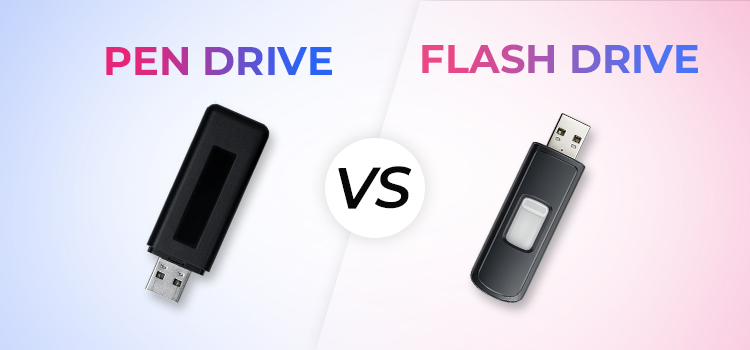
A flash drive is a broad term; it includes any storage device that uses flash memory. This can also include SSDs, memory cards, and embedded storage in devices like smartphones.
A pen drive is a specific type of flash drive that connects via USB and is used for portability.
Flash Drive vs Pen Drive: Comparison
| Basis | Flash Drive | Pen Drive |
|---|---|---|
| Definition | A broad category of storage devices using NAND flash memory | A specific type of USB-based flash drive used for portability |
| Scope | Includes SSDs, memory cards, embedded flash storage, and USB drives | Limited to portable USB storage devices |
| Interface Types | USB, SATA, PCIe, eMMC, UFS | USB only (USB-A, USB-C) |
| Form Factor | Internal chips, cards, external drives | Compact, stick-like design for easy carrying |
| Primary Use | General storage across devices (internal + external) | File transfer and portable data storage |
| Storage Capacity | From a few MB to multiple TB (especially SSDs) | Typically GB to TB range, focused on portability |
What Are the Common Problems with Flash Drives and Pen Drives?
Even though flash drives (including pen drives) are durable, they are not immune to failure. In fact, from a data recovery perspective, we’ve seen that flash-based devices are among the most commonly submitted for recovery.
Why Flash Drives Fail?
One of the most important limitations is the nature of NAND flash memory itself.
- Each memory cell on a NAND chip can only handle a limited number of write and erase cycles. So, over time, this leads to wear, and the cells degrade; they begin to lose their ability to hold a charge properly. This means you may end up with a pen drive that has data corruption or unreadable sectors.
- Another major cause is controller failure. If the controller firmware becomes corrupted or the chip itself fails, it means that the system can no longer interpret the data stored in the NAND memory.
- Physical damage is also common because pen drives are roughly used. Sometimes the USB connector can break due to repeated use. The internal circuit board can also get damaged due to impact, moisture, or electrical issues.
- Then there are logical issues. These include accidental formatting, file system corruption, or malware infections. In some cases, these problems can escalate into complex data loss scenarios, where standard recovery methods may not always work.
What Symptoms You Should Watch For
- You might notice that the drive is not detected when plugged in. In some cases, the system may detect it but show incorrect capacity, such as 0 bytes.
- One common symptom is a prompt asking you to format the drive before use. This indicates file system corruption.
- You may also see missing files, corrupted data, or unusually slow performance.
- In more severe cases, the drive may heat up or disconnect repeatedly.
💡 Stellar’s Expert Insight: A “format this drive” prompt is one of the most misunderstood symptoms. Many users click “Format” thinking it will fix the issue, but formatting overwrites the file system structures that recovery tools rely on. If your flash drive or pen drive asks to be formatted, do not format it. Disconnect the drive and contact a professional Pen Drive data recovery service.
Can Data Be Recovered from Flash Drives or Pen Drives?
The short answer is yes. In many cases, data can be recovered from both types of devices. But the approach depends entirely on the type of failure.
Logical Data Recovery
If the issue is logical, such as accidental deletion or formatting, then the recovery is straightforward.
That’s because in these cases, the data still exists in the memory. What is lost is the reference to that data. So, specialized software such as Stellar Data Recovery Professional can scan the memory and rebuild the file structure. This approach is similar to recovering data from logically damaged drives, where data is restored without repairing hardware.
Physical and Advanced Recovery
When the issue with your pen drive is physical, things become more complex. This is where professional data recovery services are almost always required—especially in cases involving data recovery from physically damaged drives, where hardware-level techniques are needed.
- One common method we use to recover data from flash drives is chip-off recovery. In this process, our technicians physically remove the NAND memory chip from the device and read from it using specialized equipment.
- Another approach we use is to repair or bypass the controller. Since the controller manages how data is mapped, recovering data means we have to reconstruct this mapping.
- There are also cases where the device is built as a monolith, where the controller and memory are integrated into a single unit. In such cases, we use advanced techniques to access hidden connection points.
Why Choose Stellar for Flash Drive and Pen Drive Data Recovery?
Stellar has been able to achieve an industry-leading pen drive and flash drive data recovery rate of up to 100% because of these USPs:
- Chip-Off Recovery Capability: When the controller has failed, our engineers physically remove the NAND memory chip and read it using specialised equipment.
- Monolith Device Recovery: For drives where the controller and memory are integrated into a single unit, we use advanced techniques to access hidden connection points and extract data.
- ISO 9001 & ISO 27001 Certified: Your data is handled under internationally recognised quality and information security standards.
- 30+ Years of Experience: Our engineers have handled flash drives, pen drive, SSD, and memory card recovery across every major brand and chipset.
Conclusion
A pen drive is a type of flash drive, but not all flash drives are pen drives—this distinction matters when understanding performance, failures, and data recovery.
Both devices rely on NAND memory and controllers, which makes them vulnerable to issues like wear, corruption, and physical damage. In most cases, however, the data still exists inside the memory chip.
💡 Key takeaway: If your drive becomes unreadable, avoid using it further. Use recovery software for logical issues, and opt for professional recovery in case of hardware failure to maximise data recovery success.
While understanding how pen drives and flash drives work is important, knowing how to handle real-world issues like detection errors, deleted files, or data loss is equally critical. The following guides cover these scenarios in detail:
FAQs
1. Is a pen drive different from a flash drive?
No, a pen drive is a type of flash drive. Flash drive is a broader term that includes USB drives, SSDs, and memory cards.
2. Why is my pen drive not showing on my computer?
A pen drive may not be detected due to file system corruption, controller failure, physical damage, or driver issues. In many cases, the data is still present, but the system cannot access it properly.
3. Can data be recovered from a pen drive?
Yes, data can often be recovered from a pen drive. Logical issues can be resolved using recovery software, while physical damage requires professional data recovery services.
4. Can data be recovered from a corrupted pen drive?
Yes, data can often be recovered from a corrupted pen drive. If the issue is logical, recovery software can help. For severe corruption or hardware issues, professional data recovery services are required.
5. Why do flash drives fail or stop working?
Flash drives fail most commonly due to NAND wear, controller issues, physical damage, or file system corruption.
6. Is it safe to format a pen drive when asked?
No, formatting a pen drive can overwrite file system structures needed for recovery. If your drive asks to be formatted, avoid clicking “Format” and use recovery software or consult a professional first.
About The Author

Urvika Tuteja is an SEO Executive at Stellar® with a good understanding of online marketing. She is known for her quick and enthusiastic learning abilities. Urvika contributes her skills to managing operational activities and driving the growth of organic traffic.