What Is Hybrid RAID? A Complete Beginner’s Guide
-
Written By Urvika Tuteja

 Approved By Shikha Khanna
-
 Updated on September 15, 2026
 -
 Min Reading 8 Min
 - Share

Summary: A hybrid RAID array nests one standard RAID level inside another. The result provides storage administrators with fault tolerance and performance simultaneously, a combination no single flat array can offer. This guide explains how the architecture works and where it departs from standard configurations. It then covers the three nested layouts seen most often in production, RAID 10, RAID 50, and RAID 60, along with the workloads each one suits, the capacity and cost each one demands, and the point at which professional recovery becomes the right response to a failed array.
इस लेख को हिंदी में पढ़ने के लिए यहां क्लिक करें।
Storage administrators choose a RAID level based on what their environment needs most: speed, redundancy, or a balance of both. Standard configurations such as RAID 5 and RAID 1 are familiar to most administrators, and in many use cases, either is enough.
Trouble starts when two requirements, minimum performance and acceptable fault tolerance, begin to pull against each other. A flat array can serve one or the other well, but rarely both, and it reaches its capacity limits at that point. This is the gap that most often shows up in database servers, virtualisation hosts, and other systems where downtime and data loss are equally unacceptable.
Hybrid RAID exists for exactly this situation. Instead of forcing administrators to settle for one compromise, it layers two RAID levels, allowing the array to draw on the strengths of each and produce a result that neither level could deliver alone. When such an array does fail, however, its layered structure makes RAID Data Recovery considerably more complex than recovering a standard single-tier array.
What is RAID? A Quick Recap
A brief recap of standard RAID is useful before examining the nested versions. RAID, short for Redundant Array of Independent Disks, is a storage technology that binds several physical drives into a single logical volume recognised by the operating system. What the array actually delivers, whether that is faster reads, protection against a failed drive, or a balance of the two, comes down to the level configured on the controller.
The most common standard levels operate as follows:
- RAID 0: The sole objective is throughput. The controller divides each file into fixed-size blocks and distributes them across two or more drives simultaneously. Protection is absent, which means a single drive failure erases everything on the array.
- RAID 1: This level mirrors data rather than striping it. Two drives hold identical copies, and each write is committed to both simultaneously. Redundancy is total, but only half of the raw capacity is usable, since the rest is allocated to the duplicate.
- RAID 5: Data and parity are striped across three or more drives, with parity derived through an XOR operation. If one drive fails, the array reconstructs its contents from the parity held on the others. For most workloads, this provides a workable balance between capacity, redundancy, and read speed.
- RAID 6: Two parity values accompany every stripe, calculated through Reed–Solomon coding and labelled P and Q. The benefit is that two drives can fail simultaneously without data loss. Four drives are the minimum requirement. Calculating two parity values on each write does carry a cost, and write speed falls below that of RAID 5 as a result.
All of these are single-tier layouts. Every drive shares the same role, and the array remains locked to a single fixed trade-off.
What is Hybrid RAID?
Hybrid RAID, also called nested RAID, places one RAID level inside another. As a rule, the inner tier supplies redundancy through mirroring or parity, and the outer tier supplies throughput through striping.
The physical drives are first organised into an inner array at the primary tier. Those groups are then combined using a different RAID level at the secondary tier. The controller manages this mapping internally, and the operating system registers only a single logical volume.
As a result, the array inherits properties from both levels. When mirrored pairs are configured at the first tier and striped at the second tier, the array provides RAID 1 fault tolerance and RAID 0 read performance. This specific configuration is known as RAID 10, the most commonly implemented nested configuration in enterprise storage.
How Hybrid RAID Differs from Standard RAID
Within a standard RAID 5 array, no drive outranks another. Each one carries a share of both the striped data and the distributed parity, and the controller operates from a single flat address space spanning all drives.
A hybrid array groups its drives instead. RAID 10 needs a minimum of four drives, organised as two RAID 1 mirror pairs at the first tier, striped together by RAID 0 at the second tier. Two structural layers operate together, both managed by the controller.
This layering changes several operational characteristics:
- Minimum drive counts increase. Each level in the stack brings its own structural floor, and the totals add up: four drives for RAID 10, six for RAID 50, eight for RAID 60.
- Usable capacity decreases. Any mirror halves the raw total. With four 4TB drives, RAID 10 leaves 8TB usable, while the same drives in RAID 5 return closer to 12TB. Over the course of a full deployment, this difference becomes costly.
- Rebuilds are faster and lower-risk. If a drive is lost in RAID 5, the controller must read from every surviving drive to rebuild the lost data, placing significant load on the entire array during the process. RAID 10 operates differently: the replacement drive draws from its mirror partner alone, and the other pairs continue running unaffected.
When Is Hybrid RAID Appropriate?
Hybrid RAID is appropriate when a single performance trade-off cannot meet the operational requirement. Different workloads place different forms of load on storage media, and the correct configuration depends on the dominant access pattern. Three considerations typically determine whether a nested configuration is the right choice:
- Database servers: Database servers generate small, random reads and writes in a constant stream. Parity-based arrays struggle here, held back by the read-modify-write penalty, which requires the controller to read the old data block, read the old parity, compute fresh parity, and then write both the new data and the new parity. RAID 10 sidesteps the penalty altogether. Reads are spread across the striping tier, while the mirrored tier takes writes with no parity step at all.
- Virtualisation hosts: These impose a different access pattern. A single host may run many virtual machines, each issuing independent requests, which combine into a highly randomised I/O stream. Nested configurations handle this well because the top-level stripe allows the controller to distribute concurrent read requests across multiple drives. Mixed read and write workloads are processed efficiently because the load is distributed across the array.
- Rebuild risk: As drive capacities increase, reconstruction times lengthen. Rebuilding an 18TB drive in a RAID 5 array can take a substantial period of continuous operation, and a second drive failure during that window results in total data loss. Hybrid configurations limit the reconstruction workload to a single mirror pair, thereby considerably reducing the exposure window.
Note: Hybrid RAID is not appropriate for every scenario. For cold storage, long-term backup archives, large sequential media files, and any application where raw capacity per unit cost is the primary metric, a standard RAID 5 or RAID 6 array provides substantially more usable storage from the same drives.
Hybrid RAID: Advantages and Disadvantages
No storage configuration is optimal across all environments. The advantages of hybrid RAID must be weighed against its costs.
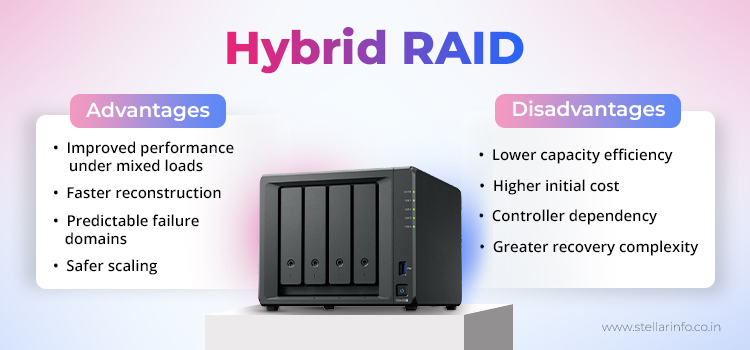
Advantages:
- Improved performance under mixed loads. Separating striping and redundancy across two tiers avoids the parity-calculation penalty on every write, improving performance on mixed read-and-write workloads.
- Faster reconstruction. Mirror-based tiers reconstruct from a single partner drive. This reduces both rebuild time and the read load on surviving drives that can otherwise trigger latent sector errors during reconstruction.
- Predictable failure domains. In a parity array, the survivability of a second failure depends on stripe geometry. In a mirrored tier, a drive failure exposes only its direct mirror partner, which makes the failure domain straightforward to assess.
- Safer scaling. A RAID 5 group becomes riskier with each additional drive, since the odds of a latent sector error surfacing during a rebuild increase with each additional drive. RAID 50 sidesteps that by breaking the drives into smaller parity groups, each isolated from the others.
Disadvantages:
- Lower capacity efficiency. Mirroring consumes raw capacity directly, which reduces the proportion of total storage available for data.
- Higher initial cost. A higher minimum drive count increases initial hardware costs and chassis, power, and cooling requirements.
- Controller dependency. Controllers use proprietary logic to map layered tiers, and not every controller supports configurations such as RAID 60. The controller specification must be verified before purchase.
- Greater recovery complexity. Reconstructing a failed multi-tier volume requires identifying the original block geometry, stripe size, and disk order for both tiers. This is considerably more complex than recovering a standard RAID 5 array.
Types of Hybrid RAID: An Overview
Four hybrid architectures account for most nested deployments in production. Each addresses a different set of trade-offs across speed, usable capacity, and fault tolerance. The following table summarises them.
| Array Type | Minimum Drives | Base Architecture | Fault Tolerance | Usable Capacity | Suited To |
|---|---|---|---|---|---|
| RAID 10 | 4 | Striped mirrors | One drive per mirror pair | Half of raw total | Databases, virtualisation, high-IOPS workloads |
| RAID 01 | 4 | Mirrored stripes | One drive per stripe set | Half of raw total | Legacy deployments where RAID 10 is unavailable |
| RAID 50 | 6 | Striped RAID 5 groups | One drive per RAID 5 group | Higher than RAID 10; rises with drive count | Large arrays needing greater capacity efficiency |
| RAID 60 | 8 | Striped RAID 6 groups | Two drives per RAID 6 group | Lower than RAID 50; rises with drive count | Critical data requiring high redundancy |
The choice between them typically depends on server workload and the amount of physical capacity available for redundancy. Each of these four architectures comes with its own configuration details and production use cases, which are covered in the next article in this series.
Conclusion: A Hybrid Array Is Only as Strong as Its Recovery Plan
A hybrid array is only as safe as the recovery plan that supports it. Multi-tier configurations offer strong resilience, but they are not a substitute for a backup. When a multi-tier array fails, the resulting file system fragmentation cannot be interpreted by generic recovery utilities.
Stellar RAID Data Recovery engineers retrieve data from failed RAID 10, RAID 50, and RAID 60 arrays within ISO 27001-certified laboratories, including cases involving simultaneous Raid drive failures, controller failure, and accidentally deleted arrays. Each recovery begins by identifying the original geometry, stripe size, member disk order, and logical block mapping for both tiers. None of this metadata is visible on a failed array, and initialising the drives without it permanently overwrites the structures required for recovery.
A failed hybrid array does not stay recoverable indefinitely. Every additional write, rebuild attempt, or initialisation run against it narrows the window in which the original data can still be reconstructed. The moment a hybrid array shows signs of failure is the moment that window starts closing.
Protect Your Hybrid Array Before It Is Too Late
A failed hybrid array offers one real chance at recovery, not two. Running an automated utility, a rebuild, or a reinitialisation against a failed array can permanently overwrite the structures required to recover the data. Once that happens, the data cannot be recovered. Consult the RAID recovery specialists at Stellar Data Recovery before taking that risk.
For a closer look at RAID configurations, common failure scenarios, and recovery approaches, see the related articles linked below.
- Choosing the Best RAID Configuration for Enterprise: RAID 10 vs. RAID 5
- RAID Data Recovery: Call a Specialist Before the Manufacturer’s Helpdesk or DIY
- RAID Storage Isn’t Always Enough: Misconceptions About RAID Servers
- RAID Level 0, 1, 5, 6, and 10 – With their Uses, Advantages, and Disadvantages
- Revealing the Power of Data Storage: JBOD versus RAID
FAQs
1. Is Hybrid RAID the Same as RAID 10?
RAID 10 is one form of hybrid RAID, not the only one. Any layout that combines two RAID levels qualifies as hybrid, including RAID 10, RAID 50, and RAID 60, and each responds to a drive failure differently.
2. Can a Hybrid Configuration Replace a Backup?
No. Redundancy protects against a single failure mode, a drive failing inside the array, but it does nothing for accidental deletion, ransomware, a failed controller, or a surge that takes out the chassis. A separate backup remains essential.
3. Does Hybrid RAID Work With Any RAID Controller?
RAID 10 works on nearly any modern controller. RAID 50 and RAID 60 have stricter requirements, needing hardware built to map multi-tier configurations, support that entry-level cards often lack. Check the controller documentation for multi-tier support before committing to a purchase.
4. Does Adding More Drives to a Hybrid Array Improve Performance?
Within limits, yes. Add more mirror pairs to RAID 10, or more parity groups to RAID 50 and RAID 60, and the controller has more drives across which to spread incoming and outgoing data, which translates directly into higher throughput. That improvement does not continue indefinitely, though. Past a certain point, the controller itself becomes the limiting factor, not the drives sitting behind it.
5. What Happens if the Hardware Controller Fails?
The data on the drives remains intact, but the logical path to it is lost. A replacement controller must support the identical nested configuration, and the original array parameters must be applied before any volume is initialised. Rebuilding without those parameters permanently overwrites the file system structures. The drives should be imaged first, and a specialist should be consulted before any rebuild is attempted.
About The Author

Urvika Tuteja is an SEO Executive at Stellar® with a good understanding of online marketing. She is known for her quick and enthusiastic learning abilities. Urvika contributes her skills to managing operational activities and driving the growth of organic traffic.