CFast Card Data Recovery: Causes, Fixes, and Data Recovery Options
-
Written By Somdatta De

- Approved By Nischal
-
 Updated on January 14, 2026
 -
 Min Reading 6 Min
 - Share


You’re wrapping up your shoot with hours of 4K footage in the bag. Everything looked perfect on playback, but when you eject the CFast card and plug it into your computer…nothing happens! The CFast card won’t mount. Worse still, you might have even formatted the wrong card. Any footage you haven’t backed up yet could be lost.
While CFast cards are built for speed in professional environments (whether you’re a cinematographer shooting RAW video or a photographer capturing bursts), they’re not bulletproof. Accidental deletions can happen. Corruption can strike without warning. Even physical damage can occur. And when it does, you’re staring at a lot of time and money wasted in lost production value.
But don’t worry, we’re going to look at CFast card data recovery techniques and tell you the best course of action to take to recover your deleted SD card footage before it gets deleted permanently!
What Is a CFast Card?
CFast (CompactFast) cards are high-speed memory cards that are designed for professional work. We’re talking 4K and 8K video recording, RAW photo bursts, and cinema cameras, where speed absolutely matters. CFast has the following advantages when compared with the older CF cards.
1. SATA Interface
It uses Serial ATA, the same interface technology as computer hard drives. This is vastly different from the parallel interface on traditional CF & CF+ cards, and you get dramatically faster speeds and more stable transfers because of it.
2. Read/Write Speeds
CFast 2.0 cards hit 500–600 MB/s reading speeds. Some models can go even higher. Write speeds typically sit between 450–530 MB/s. Traditional CF cards tend to top out around 160 MB/s, so it’s a big saving on time!
3. Professional Equipment
CFast is widely used in ARRI Alexa cameras, Blackmagic Cinema Cameras, Canon EOS-1D X Mark II, and various RED camera models (these are all the workhorses of commercial production).
4. Physical Design
CFast cards look identical to traditional CF cards (same size, similar shape). But their different pinouts mean the two are not interchangeable. Don’t try forcing one into the other’s slot!
This table will explain it simply.

CFast Card Data Loss: Common Causes
🎬 Accidental Deletion or Formatting
Hitting format on the wrong card or selecting delete by mistake happens quite often in high-pressure productions.
⚡ Unsafe Ejection
Yanking out your CFast card whilst the camera is still writing data or pulling it from computers before properly ejecting it can corrupt data instantly.
💾 File System Corruption
The exFAT or FAT32 file system can get corrupted from power interruptions, improper shutdowns, or even controller errors. This makes your entire card appear empty.
🦠 Virus or Malware
Connecting your CFast cards to infected computers can introduce malware that can corrupt or delete your files.
🔌 Power Failures During Recording
If your camera battery dies mid-recording, your files can get corrupted while being saved. In our experience, the last recorded clip gets damaged the most often.
🔧 Physical Damage
Bent pins from improper insertion, water damage, and extreme temperatures are common causes for CFast to become unresponsive. CFast cards are durable but not indestructible!
⚙️ Controller or Firmware Failure
SATA controller chips can fail, or corrupted firmware can make your CFast card unreadable despite all the NAND memory chips being intact.
What to Do Right After Data Loss From a CFast Card
- STOP using the card immediately. Don’t shoot any more footage. Don’t format your SD card. Every write operation you perform risks overwriting your deleted data permanently.
- Don’t panic and don’t look for quick fixes. We know it’s tempting, but you must resist the urge to try random recovery software. Don’t format the card even if your camera or PC prompts you to. These steps make recovery harder (sometimes even impossible).
- Check for hidden files first. Sometimes, your files appear deleted but are just hidden by malware or file system errors. This is worth checking before attempting a full recovery. We’ll explain how in the section ahead.
- Figure out the type of damage. You need to know if you’re dealing with physical damage (bent pins, cracked body, water damage) or logical failure (accidental deletion, formatting, minor corruption). Physical damage needs professional lab work immediately.
DIY Recovery Methods (And When They Work)
Before you opt for a professional data recovery service, here are some safe DIY recovery options you can try (for logical failures only).
1. Check for Hidden Files
Step 1: Connect your CFast card to your laptop/PC using a CFast card reader.
Step 2: Run Command Prompt as administrator. You can do this by pressing the Windows button, typing CMD, and clicking on Run as Administrator on the right.
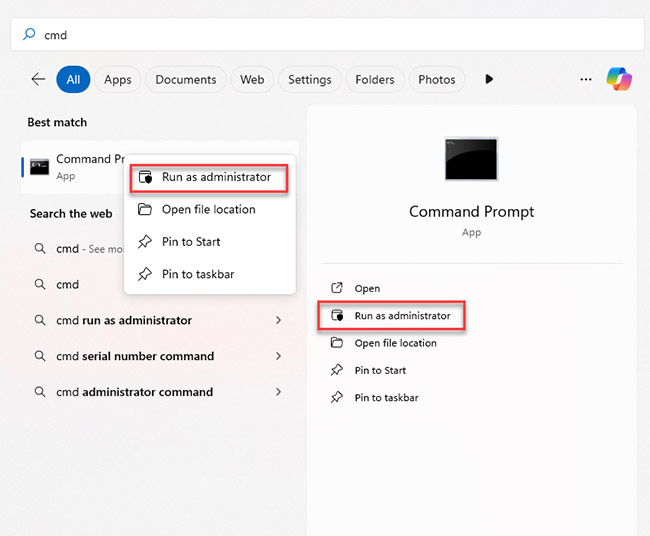
Step 3: In Command Prompt, type attrib -h -r -s /s /d E:\*.* and press Enter. (Here, you’ll need to replace E: with your card’s drive letter.)
This command removes hidden, read-only, and system attributes, so if your files are present on the card but hidden due to some logical error, they should now show up.
2. Try CHKDSK File System Repair
If revealing hidden files didn’t recover your lost CFast card data, try using Windows’ built-in file system repair utility, CHKDSK. The easiest way to do this is as follows.
Step 1: Open Command Prompt as administrator (same as above).
Step 2: Type chkdsk E: /f /r and press Enter. (Once again, replace E: with your CFast card’s drive letter.)
Step 3: Wait for the scan to complete. CHKDSK will automatically repair any file system errors it finds and mark bad sectors.
⚠️ Warning: Skip CHKDSK if you suspect physical damage. Head to a professional data recovery lab near you for memory card data recovery.
3. Backup Restoration
Finally, check these likely places for backups of your important files.
- Cloud backups: Check if your footage got synced to Google Drive, Dropbox, or any other cloud storage you’re linked with before it got deleted.
- Local backups: Check external drives or NAS systems for copies of your data.
- Dual-slot recording: If your camera records to two cards simultaneously, check the second card.
These are all the safe DIY options; if they don’t work or if you suspect physical damage, read the next section.
When Professional Memory Card Data Recovery Is Essential
The following cases require professional CFast memory card data recovery service.
🔧 Physical damage: Bent pins, water damage, cards refusing to mount, or visible cracks.
⚡ Firmware or controller failure: Card reports wrong capacity, shows 0 MB, or won’t initialize.
💾 Failed DIY attempts: Software cannot detect the card, or recovered files are corrupted.
⏰ High-value data: Commercial shoots, wedding footage, documentary projects, and client deliverables—you can’t afford to risk losing these.
Stellar’s professional CFast Card data recovery service handles scenarios DIY software cannot touch. With Stellar, you get:
✅ SATA controller repair: When controller chips fail, our technicians repair or bypass them to access memory chips directly.
✅ Chip-off extraction: For cards with damaged controllers, data is extracted directly from NAND flash chips using our proprietary tools.
✅ Firmware reprogramming: Corrupted firmware that prevents initialization is reprogrammed or rebuilt to restore access to your CFast memory card.
✅ ISO-certified cleanroom recovery: All our physical work happens in controlled lab environments that meet ISO 27001:2022 standards.
✅ Video file repair: Recovered video files with corrupted headers are repaired to ensure playability.
Stellar’s service in India handles all major brands: SanDisk, Wise, Sony, Lexar, ProGrade Digital, and others. Each year, we recover data from thousands of badly damaged or corrupted cards used in ARRI, RED, Blackmagic, Canon, and other cinema cameras.
Contact Stellar’s CFast card recovery service today for a free evaluation.
Preventing Future Data Loss From CFast Cards
🔄 Immediately backup workflows: Copy all your footage to two separate drives immediately after you shoot. Never rely on CFast cards as your only copy.
⚡ Reliable power sources: Fully charge the camera batteries before critical shoots. Avoid recording when there’s a battery warning.
🔌 Safely eject cards: Use camera menus to close files before removing cards. On computers, use the “Safely Remove Hardware” option.
📊 Monitor card health: CFast cards have limited write cycles. Rotate cards out after you use them extensively.
💾 Proper formatting: Always format CFast cards using in-camera format functions; don’t format on computers.
🦠 Malware protection: Only connect cards to trusted, protected computers.
If you’re facing similar data loss issues with other SD or memory cards, the following articles cover common problems and proven recovery methods:
FAQs
1. Can you recover data from formatted CFast cards?
Yes, if you’re quick. Formatting marks space as available but doesn’t immediately erase your data. Success depends on whether new data overwrites the formatted space.
2. How does CFast recovery differ from SD card recovery?
CFast cards use SATA interfaces, making recovery more complex. They face wear leveling, garbage collection, and controller complications that basic SD cards don’t.
About The Author

Somdatta is a professional content writer and analyst focused on the storage technology sector, with expertise in both magnetic and flash storage, as well as cloud computing and virtualization concepts. She translates technical concepts into clear, engaging content to sensitize readers toward a multitude of data loss scenarios and help them gain insights into the nuances of data recovery.