When you hear about ransomware attacks that have shut down systems at AIIMS-Delhi, Cognizant, and the Colonial Pipeline, you might think it only happens to big names.
In reality, when it comes to ransomware attacks, cybercriminals do not discriminate between individuals and businesses, government-run and privately owned institutions, or MSMEs and MNCs.
Now, the same threat is hitting hospitals, banks, businesses, and everyday people across India and worldwide. This means everyone needs to know how a ransomware attack happens and what they can do about it.
Note: For an overview of ransomware and its key types, read our guides on What Is Ransomware and Types of Ransomware, respectively.
How a Ransomware Attack Happens: Common Entry Points and Techniques
Attackers use a mix of technical tricks and manipulation to break into victims’ digital systems. Here’s how most ransomware attacks start.
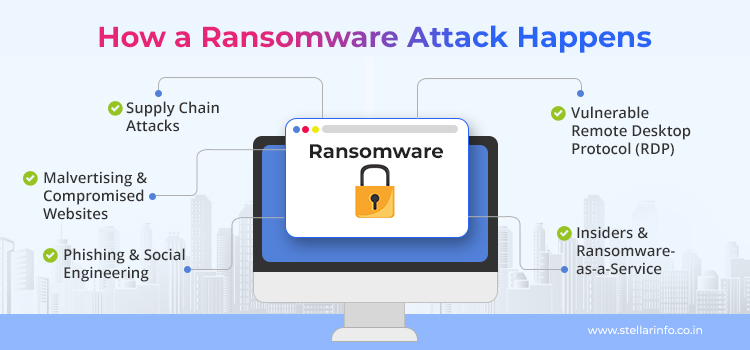
Phishing and Social Engineering
Most ransomware incidents begin with an email or a social media message.
Attackers create messages that look genuine (for instance, maybe a fake invoice or an offer email from a trusted brand). This is to trick you into opening a malicious attachment or clicking a link. That’s all it takes to trigger a ransomware virus download. You won’t always notice anything unusual until your files are locked.
Malvertising and Compromised Websites
Sometimes, you visit a legitimate website with a bad ad (malvertising), which can silently download malware onto your machine. This is way more likely to happen if your browser or plugins are outdated.
Vulnerable Remote Desktop Protocol (RDP)
Many organizations use RDP to offer remote access to employees. But if it’s left exposed to the internet, attackers can use “brute force” techniques to guess a weak password and gain entry. Once inside, they spread ransomware across the network.
Supply Chain Attacks
In many cases, attackers compromise third-party vendors like IT service providers or software updates and are able to distribute ransomware to many organizations at once.
Insiders and Ransomware-as-a-Service
Not all threats come from outside. Sometimes, all it takes is a disgruntled employee or an attacker with stolen credentials to expose an organization’s systems to ransomware. Also, with “ransomware-as-a-service,” even low-skill criminals can rent attack tools from criminal networks.
What does all of this mean for you? The main takeaway is that ransomware attacks depend as much on cybercriminals with access to sophisticated technology as they do on you staying informed and alert.
How Does a Ransomware Attack Pan Out?
If you suspect you’ve been hit by a ransomware attack, it helps to know what’s happening in the background. Here’s what typically unfolds during a ransomware attack.
- Once the attacker’s malware lands on your system (through phishing, malvertising, or some other method), it quietly runs in the background.
- The ransomware scans for valuable files on your local drives, network shares, and sometimes, even cloud storage.
- If your machine is connected to a network, the attack doesn’t stop at one device.
- Before encryption begins, attackers usually delete your Volume Shadow Copies (VSS) and other local backups.
- Then the ransomware locks your files using strong encryption algorithms (like AES or RSA).
- After the encryption finishes, a ransom note appears with instructions to pay.
What Happens to Your System During a Ransomware Attack?
The moment a ransomware virus finishes its attack, you will see some obvious changes.
- The most immediate symptom is that your important files are inaccessible.
- You may notice your system slowing down dramatically during the attack. This is due to the heavy workload of encrypting thousands of files as fast as possible.
- Many strains of ransomware malware append new extensions (like .locked, .encrypted, or custom variants) to every affected file.
- If you try to restore files from Windows’ shadow copies or your scheduled backup, you will find that these are missing or corrupted.
- Business-critical applications may crash or refuse to open, especially if their data files are encrypted. For organizations, this can halt operations completely.
Behind the scenes, ransomware can also disable your antivirus tools and delete event logs. Some advanced strains (like NotPetya or Petya) attack the Master Boot Record (MBR) and make the whole system unbootable.
How Attackers Contact Victims & What They Demand
Attackers leave clear, unavoidable ransom notes on your system. These notes:
- Explain that your files are encrypted by a specific ransomware type.
- List the ransom amount, which is usually in cryptocurrency (most often Bitcoin).
- Provide a deadline for payment (with a countdown timer).
- Include a link to a payment site that is typically hosted on the dark web using the TOR browser, with an address ending in .onion.
- Threaten to increase the ransom, destroy files, or sell the data on the dark web if you contact law enforcement or fail to pay in time
In larger or high-profile attacks, you might see additional pressure—such as direct emails, follow-up on calls, or threats to release your confidential data publicly (a “double extortion” strategy).
Some recent ransomware attacks on banks in India involved demands exceeding ₹1 crore, with threats to leak sensitive customer data if payment was delayed.
Types of Responses: What Should You Do After a Ransomware Attack?
The right response depends on your preparation, the attack’s severity, and whether you have backups. Here’s what you should or shouldn’t consider.
1. Restore From Backup
This is the best-case scenario. If you’ve kept recent, secure backups offline or on the cloud, you can wipe your system, reinstall clean software, and restore your files from the backup.
2. Call a Ransomware Recovery Specialist
If your backups are missing or broken and your in-house IT team can't handle the ransomware, you should immediately reach out to professional ransomware data recovery experts.
Stellar’s ransomware recovery experts have successfully restored data from thousands of ransomware-infected systems. They employ sophisticated methods and bank on their knowledge of various ransomware strains to retrieve data encrypted or compromised by ransomware.
3. Accept the Loss (Do Nothing)
If you don’t have backups and your files aren’t critical, you can choose to accept the loss, wipe your machine, and start afresh.
The important thing is to decide and act quickly. Equally important is to not give in to the demands of the cybercriminals or try manual workarounds like using free decryptors.
4. Do Not Try to Decrypt Your Files
For certain older types of ransomware, security researchers and vendors have developed free decryption tools. However, these only work on old and poorly designed variants of common ransomware. Moreover, most websites that promise to provide such “decryptors” are themselves hosts to various malware that can further infect your system and complicate recovery.
5. Do Not Negotiate or Pay the Ransom
Most security experts and law enforcement agencies strongly advise against paying ransom. Here’s why.
- There’s no guarantee you’ll get your files back.
- It leads to larger ransom demands.
- Most victims who pay are targeted again (80%, according to a large-scale study by Cybereason). For deeper insights into the financial and operational fallout of ransomware, refer to this report on the true cost of ransomware attacks.
- Paying funds further criminal activity.
But if you absolutely must pay (for example, for mission-critical, irreplaceable data), consult with legal and security professionals first. In India, banks and regulated entities must also report the incident to CERT-In and relevant authorities.
Whichever path you choose, document everything, preserve evidence, and get help from cybersecurity professionals.
When Expert Help Matters in Ransomware Data Recovery
Sometimes, even after your best efforts, recovery from a ransomware attack seems impossible. In such a situation, you should reach out to ransomware data recovery experts.
At Stellar Data Recovery, we’ve helped organizations of all sizes bounce back from some of the toughest ransomware attacks.
Our approach blends deep technical know-how (like RAW recovery and custom file carving) with strict confidentiality and rapid response, so you’re not left waiting.
If your business relies on mission-critical data or if you’re unsure what to do next, you could find new options when you consult with an expert.
Sometimes, what looks unrecoverable isn’t the end of the story. Our track record shows that with the right tools and experience, recovery from ransomware is possible even in challenging cases.
The Importance of a Prepared Incident Response Plan
By now, you’ve seen that a ransomware attack is more than just a technical hurdle. It can bring your business to a halt, damage your reputation, and even lead to legal trouble.
That’s why having a prepared incident response plan (IRP) is so essential.
Why Does Preparation Matter So Much?
- Ransomware strains keep getting more potent with time. New ransomware virus variants and attack techniques appear every month.
- Attacks happen fast but do not always manifest themselves. The time between infection and detection can be months! It’s important to regularly monitor your systems.
- Unprepared organizations lose the most: data, money, and often customer trust.
What Should a Strong IRP Include?
- Assign responsibility for isolating infected systems, communicating with stakeholders, and preserving evidence in case of a ransomware attack.
- Keep backups, make sure they are secure, test them often, and make sure at least one backup copy is offline or out of reach for attackers.
- Limit how far an attacker can move within your systems.
- Regularly rehearse how your team would respond to a real ransomware attack.
- Ensure your plan covers isolation, forensics, notification, ransomware recovery, and communication with authorities.
- Have up-to-date contact info for CERT-In, local cyber police, your bank, and insurance providers.
Practical tip: Store your incident response plan in multiple places (including offline) so it’s accessible even if your main systems are encrypted.
While you can’t always prevent a ransomware attack, you can limit the damage and recover faster if you prepare in advance.
As experts in data care, we urge you to treat every suspicious email, unexpected file, and unprotected system as a potential threat. The steps you take before an attack will matter more than anything you do after the damage is done.
If you need help assessing your readiness or recovering from an incident, reach out to a trusted data recovery or cybersecurity expert.
Remember, resilience is your best defense.
Success Cases of Ransomware Data Recovery
Review real-world examples of how we’ve helped clients impacted by ransomware—recovering encrypted data, rebuilding damaged systems, and ensuring business continuity. Each case highlights our capability to manage high-severity incidents with precision.
FAQs
Most known cases use AES (Advanced Encryption Standard) to encrypt user files. Then the ransomware uses a method called RSA encryption to lock the AES keys themselves. This two-layer approach means that breaking the encryption is very difficult without the attacker’s private key.
Yes, it can. Ransomware attacks can spread to your cloud storage if the infected device is synced to the cloud. For example, if you have Google Drive on your PC and your local files are encrypted, then the changes can sync and overwrite the healthy cloud copies.
Ransomware-as-a-service, or RaaS, is a model where cybercriminals build ransomware and then let others rent or buy it to launch ransomware attacks. This means that even unskilled attackers can target businesses and individuals. RaaS operators handle the technical part and even offer customer support to the attackers and take a cut out of the ransom. This has made ransomware far more widespread, and new attack groups are appearing every month.


About The Author