Ransomware isn’t a single threat. In fact, it’s an entire ecosystem of attacks, and each attack is characterized by its own tactics, technology, and threats.
Let’s consider some recent examples.
- When LockBit crippled AIIMS Delhi’s hospital systems, attackers used double extortion (which means they not only encrypted critical files but also stole sensitive data and threatened to leak it unless a ransom was paid).
- In the infamous WannaCry ransomware outbreak, attackers used automated crypto ransomware to encrypt files across Indian banks and telecom companies. They exploited unpatched systems in minutes.
- Meanwhile, NotPetya struck global corporations with a wiper ransomware that left data permanently destroyed regardless of ransom payment.
These cases show that not all ransomware work similarly. Some lock your screen, others steal data, and the most advanced can erase entire networks. Hence, it’s critical to understand the types of ransomware threats you might face.
What you need to do and how successful your recovery possibility depends entirely on the type of ransomware involved.
This guide explains how you can identify, respond to, and recover from each one.
The 5 Main Types of Ransomware
An understanding of the five main types of ransomware is critical for anyone hoping to respond to cyberattacks effectively. Let’s break down what makes each variant so distinct.
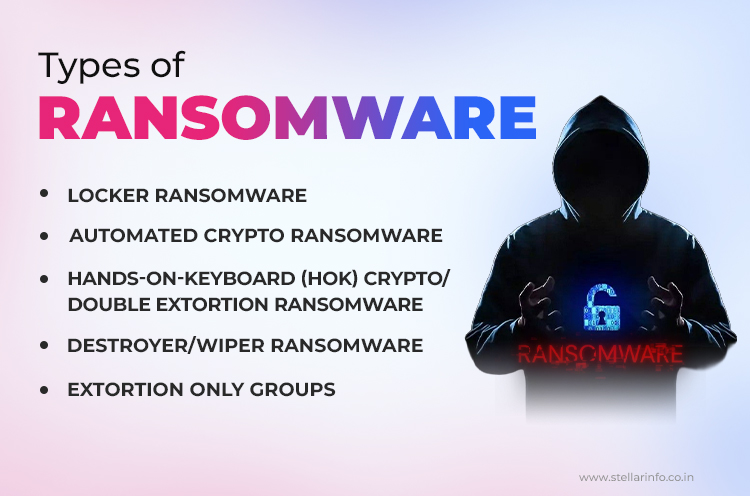
1. Locker Ransomware
Locker ransomware is one of the earliest and simplest forms. Its main tactic is to lock your access to your entire device, such as a Windows PC or an Android phone. It does not encrypt the files themselves.
You’re greeted with a full-screen ransom note that prevents you from reaching your desktop, files, or applications.
Typical Targets: Home users and mobile devices are at the most risk.
How It Works: Locker ransomware spreads via malicious downloads, infected apps, or suspicious websites. Once it runs, it changes system settings (sometimes registry entries or boot configurations) to block normal access.
The ransom demand in this type of ransomware is often designed to impersonate law enforcement (like the infamous “FBI MoneyPak”).
2. Automated Crypto Ransomware
When most people think of a ransomware virus, they’re thinking of this type. Automated crypto ransomware seeks out and encrypts valuable user files such as documents, images, databases, and sometimes entire servers. It used strong cryptographic algorithms for this.
This type of ransomware is distributed via massive phishing campaigns, malicious attachments, compromised websites, or software vulnerabilities (as seen in the infamous WannaCry ransomware attacks in 2017, which hit Indian banks and hospitals).
Attack Process
- Scans for target file extensions (e.g., .docx, .jpg, .xls, .db).
- Uses AES or RSA encryption to render files unusable.
- Leaves ransom notes with payment instructions with a demand for payment in Bitcoin or Monero.
Notable families: CryptoLocker, Locky, CryptoWall, STOP/DJVU, and the notorious WannaCry
3. Hands-on-Keyboard (HOK) Crypto/Double Extortion Ransomware
This is ransomware’s most advanced and most dangerous version. Instead of simply spreading via email or links, attackers manually break into your network using hacking tools, stolen credentials, or vulnerable remote access points (such as exposed RDP, VPN, or even third-party software like AnyDesk).
The 2022 LockBit attack on AIIMS Delhi shut down medical systems and patient care for days and all this while the attackers threatened to leak hospital data.
Phases of Attack
- Reconnaissance: Attackers map your network and find critical systems.
- Privilege escalation and lateral movement: They steal or crack admin credentials to access more machines.
- Data exfiltration: They copy sensitive files, contracts, HR records, and financial data.
- Encryption: They deploy ransomware across as many endpoints as possible and delete your shadow copies and backups.
- Double extortion: They threaten to leak or sell your confidential data if you don’t pay.
Notable families: Maze, Conti, REvil, LockBit, DarkSide
4. Destroyer/Wiper Ransomware
Destroyer or wiper ransomware is engineered for sabotage instead of profit. Such ransomware may pretend to offer decryption if you pay, but in reality, its encryption is unrecoverable even with a key, and often, it overwrites/wipes the files (sometimes the Master Boot Record as well).
The purpose of this type of ransomware attack is to cause maximum damage. That’s why we see this type used in politically motivated cyberattacks or as a smokescreen for other attacks.
Notable Example: The NotPetya attack crippled a major Indian port in June 2017. Overall, India was the seventh-worst hit nation.
5. Extortion-Only Groups
This newest wave abandons the classic ransomware attack model. Here, threat actors breach your systems, steal confidential files, and then threaten public release unless you pay a ransom.
No files are encrypted, so you may not realize you’ve been breached until the extortion note arrives.
Attack Tactics
- Extortion-only groups target organizations with sensitive, regulated, or high-value data.
- They will even research your cyber insurance to tailor ransom demands.
- They may contact the victims’ clients, partners, or the media to maximize pressure.
Examples: Lapsus$, Karakurt, and several high-profile cases reported in 2023 & 2024, especially in the finance and education sectors.
Types of Ransomware: Summary
| Type | Main Action | Common Targets | Example |
|---|---|---|---|
| Locker | Locks device, no encryption | Individuals, mobile users | WinLock, Reveton |
| Automated Crypto | Encrypts files | All users, SMEs | WannaCry, CryptoLocker |
| HOK/Double Extortion | Manual, targeted, encrypts + steals data | MNCs, hospitals, government departments | LockBit |
| Wiper/Destroyer | Destroys data | Enterprises, critical infrastructure | NotPetya |
| Extortion-Only | Steals & threatens leak | Organizations with sensitive data | Lapsus$, Karakurt |
Industry Insight: Rising Ransomware Trends in India
For a broader perspective on how ransomware attacks are evolving across the country, explore this detailed Hindustan Times coverage on the midnight ransomware surge and expert recommendations from Stellar specialists for CIOs and CISOs to strengthen their defences.
Why Ransomware Type Dictates Recovery and Risk
Knowing the type of ransomware matters because it tells you what you can actually do next. Some types can be fixed with backups or special tools. Others, like wipers, mean your files are gone for good. If it’s double extortion, your private data is at risk of getting leaked.
By knowing more about the type of ransomware attack, you can save time by only considering the right informed choices of what to do next.
How to Recover From the 5 Ransomware Types: Actionable Steps and Decision Points
Let’s walk through a practical recovery plan. We start from a point where you are not aware of the type of ransomware that has attacked your systems and go stepwise from there.
Step 1: Isolate and Assess
- Disconnect affected devices from the network so that the ransomware virus doesn’t spread further.
- Take photos or screenshots of ransom notes, error messages, or file extensions, so you can show them to an expert without having to switch on your system.
Step 2: Identify the Type of Ransomware
To do this, you’ll have to rely on your observations of the system issues you noticed before you saw the ransom note.
- Did you see the ransom note on your computer before you reached your desktop screen? It’s probably a Locker ransomware.
- If you saw that the files were renamed or had strange extensions and could not be opened, you’re likely facing crypto ransomware or a double extortion variant.
- If there are signs of a data breach with no encryption, you are likely facing an extortion-only attack.
- If your systems won’t even boot or are showing a message about unrecoverable files, suspect a wiper ransomware attack.
- Though there are free online tools like ID Ransomware that can help narrow down the variant, it’s better to seek the help of a ransomware expert.
Step 3: Universal Next Steps
- For Indian organizations, the first step is to inform CERT-In (required by law).
- Also notify your IT/security provider and, if needed, law enforcement.
- Don’t delete logs, emails, or infected files. These are critical for forensics and, sometimes, future legal action.
- Alert staff and leadership.
Step 4: Type-Specific Recovery Approaches
Locker Ransomware
- Because there is no encryption in this case, you can isolate the computer from the network and try to reboot into Safe Mode. Then, run reputable antivirus or anti-malware tools to remove the locker program.
- A data recovery expert may be able to manually edit the registry or boot records, so consult professionals.
If this tactic works, immediately change all passwords, and repeat the process on each computer in isolation.
Automated Crypto Ransomware
- Some ransomware strains of this type can be defeated using public domain decryptors. Seek the advice of data recovery experts before attempting decryption using online tools.
- If you don’t have any offline backups, the next step is to contact a professional ransomware data recovery service for advice.
- If the experts can restore your data, you should fully clean or re-image the affected systems to remove any lingering threats.
Hands-on-Keyboard (HOK) Crypto/Double Extortion
- Call in expert incident response teams for full forensic analysis.
- Rebuild every compromised machine from “gold image” offline backups (not just those showing signs of attack).
- Assess what data was stolen.
- Prepare a data breach notification and course of legal action.
- Monitor for leaks on the dark web or public sites, as attackers may still release your data.
Destroyer/Wiper Ransomware
- Accept that complete decryption is impossible. These strains are designed to make data recovery futile.
- Wipe all infected systems and rebuild from clean offline or offsite backups.
- If no backups exist, the only option is to seek the help of ransomware recovery specialists like Stellar, who might be able to recover partial data.
- Use this as a lesson: invest in robust, tested backup strategies.
Extortion-Only Groups
- Focus on comprehensive digital forensics to determine what was stolen and how the attacker gained access.
- Patch security holes and remove any attacker footholds.
- Consult legal and compliance experts about breach notifications and regulatory reporting.
- Prepare for public communications.
Preparation Is the Only Reliable Insurance Against Ransomware
Ransomware threats are always evolving. And the business disruption is so severe for organizations under a ransomware attack that paying a ransom seems like a valid option.
However, we always advise against this, as studies show that in a majority of cases, those who pay the ransom are attacked again.
The only dependable defense is thorough preparation.
- Build robust, isolated backups and test them regularly.
- Invest in user training, vulnerability management, and rapid incident response plans.
- Stay informed about new types of ransomware and attack strategies.
In these times of immense digitization, every organization and individual is a potential target of ransomware attacks.
The most effective approach is to expect an attack, prepare for the worst, and act swiftly the moment trouble starts.
Expert Insights on Ransomware You Shouldn’t Miss
For more expert guidance on ransomware threats and recovery, explore the resources below.
Real-World Examples of Successful Ransomware Data Recovery
See how our team has recovered encrypted and inaccessible data in some of the toughest ransomware situations. The following case studies offer a clear view of our recovery capabilities.


About The Author