Conventional Magnetic Recording (CMR) is a hard drive recording method that writes every data track separately, with a small gap between neighbouring tracks. This gives steady write performance, which is why CMR is the preferred technology for RAID arrays, NAS devices, and enterprise storage.
The term CMR often becomes relevant only when a drive purchase goes wrong. The problem usually shows up in one of the following ways.
- A NAS rebuild stalls.
- A RAID array behaves unpredictably.
- A drive that looks identical to its predecessor performs far worse under sustained writes.
In most of these cases, the recording technology is the cause, and product pages rarely state which method a drive uses. Understanding how CMR differs from Shingled Magnetic Recording (SMR) helps avoid the problem before buying a drive.
What Is CMR in Hard Drives?
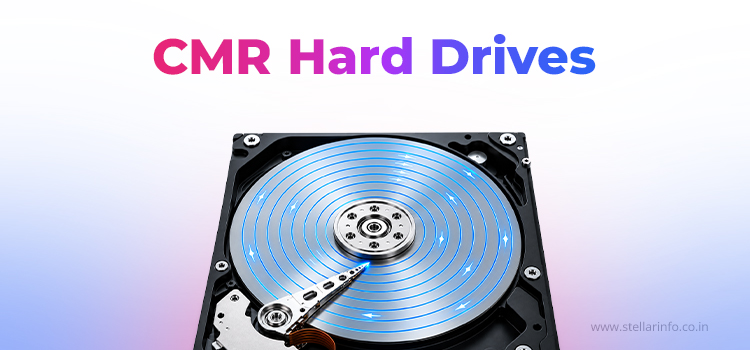
CMR is the traditional method of writing data to a hard disk, in which each track is written separately and separated from its neighbours by a small gap.
- Tracks do not overlap, which allows the drive to rewrite individual sectors directly.
- Direct rewriting keeps performance predictable under random and repeated write workloads.
- Almost all hard drives used CMR until SMR emerged with higher density.
How Does CMR Work?
A hard disk platter has a magnetic coating. A read/write head moves along the platter’s radius and writes data in concentric tracks. The difference between CMR and newer recording methods lies in how these tracks are arranged.
How Are Tracks Arranged in a CMR Drive?
- Each track stands alone, separated from adjacent tracks by a small buffer of unused space.
- The buffer is needed because the write head produces a magnetic field slightly wider than the track. Without a gap, writing to one track could disturb data on the next.
- The trade-off is areal density. Space reserved between tracks means a CMR platter stores less data than a design that allows overlap.
- SMR was created to address this compromise, at the cost of write predictability.
How Does the Read/Write Head Work in a CMR Drive?
- Writing is direct. The head moves to the relevant track and rewrites only that track, without touching its neighbours.
- Reading works in the same way. The head passes over the target track and retrieves data without referring to surrounding tracks.
- This independence is the mechanical reason CMR drives handle random writes and small file updates consistently.
- There is no intermediate buffering step, no reshuffling of neighbouring data, and no cumulative write amplification.
What Is the Difference Between CMR and SMR?
SMR overlaps tracks in a pattern similar to roof shingles. This increases storage density, but writing to one track can force the drive to rewrite data on neighbouring tracks. CMR keeps tracks separate, which gives up the extra capacity that SMR provides.
| Feature | CMR | SMR |
|---|---|---|
| Track Layout | Separate Tracks with Gaps | Overlapping Tracks |
| Write Behaviour | Direct and Consistent | Adjacent Tracks May Need Rewriting |
| Storage Density | Lower | Higher |
| Cost per Terabyte | Higher | Lower |
| Best Suited To | RAID, NAS, Databases, Virtual Machines | Archival and Sequential, Write-Once Workloads |
For a detailed comparison of cost, capacity, and performance, read the full guide on CMR vs SMR hard drives.
What Are the Advantages of CMR Hard Drives?

CMR hard drives remain the preferred choice for demanding storage setups, as they maintain steady write performance under heavy, unpredictable workloads.
Consistent Write Performance
- Each track is written independently, which keeps performance steady as the drive fills up and as write patterns become more random.
- A CMR drive keeps similar speed when it is nearly empty or nearly full, unlike many other recording methods.
Better Suited to Random Writes and RAID Rebuilds
- RAID rebuilds write large volumes of data to many sectors in an unpredictable order. CMR’s lack of write amplification matters most in this scenario.
- Drives with overlapping tracks can take much longer to rebuild an array.
- In some documented cases, such drives have failed to finish a rebuild within the controller’s timeout window.
Reliability in Enterprise Workloads
- Database servers, mail systems, and virtualisation hosts generate a steady stream of small, random writes.
- CMR architecture handles this pattern well, as each write stays within its own track.
- Most drives marketed for enterprise or NAS use still specify CMR instead of SMR.
What Are the Limitations of CMR Hard Drives?
CMR hard drives have two main limitations: lower areal density and higher cost per terabyte.
Lower Areal Density
The inter-track gaps that enable CMR’s predictable behaviour also limit the amount of data each platter can store. Manufacturers have substantially increased CMR density over time through advances such as perpendicular recording and helium-filled enclosures. Under comparable conditions, however, CMR continues to trail SMR and emerging technologies such as Heat-Assisted Magnetic Recording (HAMR).
Cost per Terabyte
When drives of a similar generation are compared, lower density usually means a higher cost per terabyte. A CMR drive needs more platters, or more expensive ones, to match the capacity of an equivalent SMR model. Buyers who want the most storage for the lowest price may find SMR the better value, as long as their workload involves mostly sequential writes.
Where CMR Drives Fit Best
CMR drives are best suited for NAS systems, RAID arrays, and enterprise environments where consistent write performance and dependable rebuilds matter.
NAS and RAID Systems
CMR is the preferred choice for NAS systems and RAID arrays, particularly where rebuild time and rebuild reliability are a concern. Because each track can be rewritten independently, rebuilds tend to complete faster and with far less risk of timing out mid-process.
Enterprise and Transactional Workloads
Servers handling databases, email systems, or other transactional workloads benefit from CMR’s consistent write behaviour. These environments generate a steady stream of small, random writes, and CMR handles that pattern without the slowdowns that can affect overlapping-track designs.
Popular CMR Drives by Manufacturer
Most major manufacturers offer dedicated CMR lines aimed at these use cases.
| Manufacturer | Series | Usage |
|---|---|---|
| Western Digital | WD Red Plus, WD Red Pro, WD Gold | NAS, Enterprise Storage |
| Seagate | IronWolf Pro, Exos | NAS, Data Centre |
| Toshiba | N300, MG Series | NAS, Enterprise Storage |
How to Identify a CMR Drive
A CMR drive is identified by checking its model number against the manufacturer’s official specifications.
- Manufacturers do not always mention the recording technology prominently on retail packaging.
- The most reliable method is to look up the exact model number on the manufacturer’s specification sheet or compatibility list on their respective website.
- The recording method is usually listed alongside interface type and cache size.
Series names alone are not a dependable guide, as some manufacturers have used SMR in models within a series that previously used CMR.
Final Thoughts on CMR Hard Drives and Data Recovery
CMR is a dependable recording technology for workloads that demand consistent write performance, which is why it is widely preferred for NAS systems, RAID arrays, and enterprise storage. The principal considerations are summarised below.
- CMR records data on discrete, non-overlapping tracks, keeping write behaviour predictable and RAID rebuilds reliable.
- CMR’s main trade-offs relative to SMR are lower areal density and higher cost per terabyte.
- Buyers should confirm the exact model number on the manufacturer’s specification sheet before purchase.
- CMR drives can fail, and data recovery should precede any drive replacement.
A failed drive does not have to mean lost data. A warranty replacement provides a new drive but does not restore the files from the original one. Stellar Data Recovery is a trusted name in India, with three decades of experience in recovering data from WD, Seagate, and Toshiba hard drives. As an authorised WD data recovery partner, Stellar handles every case at a dedicated recovery facility with an ISO-certified Class 100 Cleanroom.
Failed CMR drive? Get expert recovery from Stellar Data Recovery with a free consultation on 1800 102 3232.
FAQs
CMR is often considered better for workloads with frequent writes, random data updates, and a need for consistent write performance. SMR can suit archival and capacity-focused needs. The storage requirement should decide the choice.
Check the exact model number against the manufacturer’s official specification sheet or support page. Model names alone are not always a reliable guide, since some manufacturers have used SMR in models within a series that previously used CMR.
Yes. CMR writes to individual tracks without disturbing neighbouring data, which makes RAID rebuilds faster and more reliable. This is why most RAID and NAS manufacturers recommend CMR drives for use in arrays.
Yes. Consistent write performance and dependable rebuild behaviour make CMR drives the recommended choice for most NAS devices.
Yes, in most cases. A professional recovery provider with a cleanroom facility can recover data from a failed CMR drive. The drive should be powered off and handed over without further use.


About The Author

Professional Content Writer and Analyst