Ransomware is a type of malware that encrypts your files or locks your computer system and then demands a ransom payment to unlock your data. In simple terms, ransomware takes your information hostage. Attackers who perpetrate ransomware typically demand payment in cryptocurrency, which makes it difficult to trace or reverse the transaction.
Once a ransomware installs on your device (through a malicious link, attachment, or security vulnerability) it quickly encrypts your files using very strong algorithms. This means your documents, photos, databases, and other critical files become unreadable. The same software can also transfer all your data to a cloud storage directly under the control of cybercriminals.
The software then plants ransom notes on your system, which shows as a pop-up window or a text file, and tells how much and where you need to pay to:
- get a decryptor tool from the cybercriminals to recover your data, and
- to get the cybercriminals to agree to not selling or distributing the data they may have stolen from your system.
Today, ransomware is a threat for everyone who uses a computer or smartphone. Cybercriminals who spread ransomware and then extort money can target anyone from home users and small businesses to large enterprises and government agencies.
At Stellar, we see firsthand how ransomware attacks become more frequent, more sophisticated, and more damaging each year.
To defend yourself and your organization, you need to understand the fundamentals of ransomware.
How Do You Know Your Computer Has Been Infected By Ransomware?
How do you know you have ransomware on your device or network?
Look for these clear warning signs:
- Your regular files (like .docx, .xlsx, .jpg) suddenly show up with unfamiliar extensions such as .locked, .crypt, or a random string.
- A ransom note appears on your screen, as a pop up as soon as you log in or as a text or HTML file in every folder.
- You might find you can’t open files, folders, or even entire drives. Sometimes, your whole computer will be locked at startup with a message from the attacker.
If you see any combination of these symptoms, act immediately.
The longer ransomware runs, the more damage it can do.
Get step-by-step guidance on what to do if you discover a ransomware infection: How to Respond to a Ransomware Attack
Remember:
- Not all malware is ransomware, but ransomware is a type of malware.
- Even if your antivirus detects and removes the ransomware virus, your files may remain locked unless you have backups or a recovery solution.
How Does Ransomware Attacks Work?
To truly protect yourself, you first need to understand how ransomware attacks work.
Broadly, there are two main categories of ransomware based on how the infection is triggered: automated (mass-spread) ransomware and human-operated (targeted) ransomware.
Automated Ransomware Attacks
These attacks rely on mass distribution of covert ransomware installer packages. Attackers use a variety of tactics to distribute these installers:
- They distribute phishing emails with malicious attachments or links and users who open these attachments or click links unknowingly install ransomware.
- They create malicious websites that trigger a “drive-by download” which silently installs ransomware when users visit these websites.
- They scan the internet for unpatched software vulnerabilities in services directly exposed to the internet, like old web servers, RDP, or SMB and then use automated tools to exploit these weaknesses and deploy ransomware without direct user action.
Once you mistakenly install the ransomware, It then scans your system for valuable files and encrypts them automatically. Most ransomware will also search for shared folders, network drives, or attached backup devices to maximize the damage.
Examples:
- WannaCry
- Petya/NotPetya
- Bad Rabbit
- SamSam
Human-Operated Ransomware (Enterprise Intrusions)
This approach is far more targeted and sophisticated. Here, attackers:
- Gain access using stolen credentials which they may have obtained through phishing, password leaks, or by buying them on the dark web.
- Exploit vulnerabilities in remote access services like RDP, VPNs, or firewalls, especially those with weak passwords or outdated patches.
- Move laterally within the network, and once inside, they use legitimate admin tools to explore your systems, escalate privileges, and identify your most valuable data and backups.
- Disable security solutions and backups to increase leverage and reduce your recovery options.
Once the attackers have enough control, they launch the ransomware manually at a time when your IT team is least likely to notice (like weekends or holidays). They can:
- Encrypt every accessible device at once
- Delete or encrypt your backups
- Steal sensitive data for additional double extortion (that is, threatening to leak your data if you don’t pay)
Human-operated ransomware is behind some of the most expensive and devastating attacks today.
Groups like LockBit, REvil, and BlackCat use this method to target large organizations and demand millions in ransom.
Examples:
- Ryuk
- LockBit
- Hive
- REvil (Sodinokibi)
- BlackCat (ALPHV)
Understanding the attack method helps you anticipate what might happen next and how to respond.
For a step-by-step breakdown of how a ransomware attack proceeds from downloading the ransomware to demanding a ransom, see: How a Ransomware Attack Happens and What to Do Next.
Ransomware by Device and OS Types
Ransomware is not limited to just Windows PCs. It can attack almost any platform or device.
Ransomware can affect:
- Windows
- Linux Servers & NAS
- macOS
- Mobile Phones (Android, iOS)
- External Drives & Backups
At Stellar, we’ve seen ransomware cripple every type of device, right from home laptops to enterprise storage arrays.
Our advice is always to assume that any device connected to your network can be at risk and to plan your defenses accordingly.
Need technical guidance for your scenario?
See our recovery stories:
- Data Recovery from Ransomware-Infected WD Hard Disk Drive
- Success Story: Ransomware Attack on EVM SSD
- Data Recovery from Ransomware-Affected Virtualization System
- Ransomware Data Recovery for Hyderabad Hospital: How Stellar Restored Critical Databases
- 32 TB Data Recovered After "Weaxor Ransomware" Encrypts Education Company’s RAID 6 Server
What to Do Immediately After a Ransomware Attack
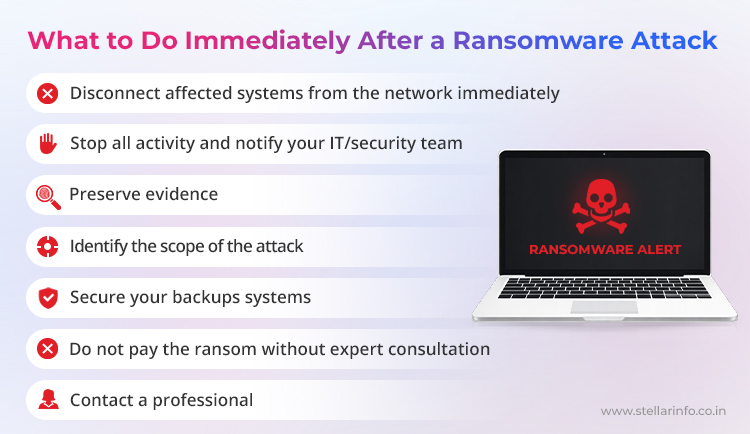
If you realize you have been hit by ransomware, your actions in the first few minutes and hours can make a huge difference.
Here’s exactly what you need to do:
- Disconnect from the network immediately: Unplug your device from the internet and any local networks. If you’re on Wi-Fi, turn it off. This is crucial because many ransomware attacks try to spread to other computers and network drives as quickly as possible.
- Stop all ongoing work and alert your team: Tell your IT department or your company’s security contact right away. If you work alone, stop using the device. Do not try to open or modify any files.
- Preserve evidence: Do not delete the ransom note or any suspicious files. Take photographs or screenshots of the ransom message and note any strange filenames or extensions. This information will help professionals identify the ransomware variant and determine the best response.
- Identify the scope of the attack: Check if other computers, servers, or shared folders are also affected. If the attack is still in progress, isolate additional devices.
- Secure your backups: Immediately disconnect any external backup drives, cloud backup syncs, or network-attached storage devices if they are not already affected. Many ransomware viruses are designed to search for and encrypt backups.
- Do not pay the ransom right away: The instinct to recover your data quickly is understandable, but paying the ransom is risky. There is no guarantee you will get your files back, and in many cases, attackers demand more money or never respond after payment.
- Contact a professional: If your data is critical or if multiple systems are involved, reach out to a ransomware data recovery specialist, like Stellar Data Recovery.
Note: If you’re a business, activate your incident response plan. Inform management, legal, and (if applicable) regulatory authorities quickly.
How to Recover Data After a Ransomware Attack
After you’ve contained the incident, the next challenge is: how do you recover your data?
First, assess your backup options:
- If you have recent, uninfected backups stored offline or on a secure cloud platform, this is your fastest route to recovery.
- Always scan your backup files for malware. If possible, restore files to a clean device to ensure you are not reintroducing the ransomware.
Check for a free decryptor:
Some ransomware types have been cracked by security researchers. Use a reputable site like NoMoreRansom.org to check if a decryption tool is available for your particular ransomware variant. Upload a ransom note or an encrypted file to see if you are in luck.
Consider professional data recovery:
When backups don’t exist or aren’t working, a professional ransomware data recovery service like Stellar can make a huge difference.
- Our engineers use a combination of advanced forensics, specialized tools, and years of expertise to recover data from ransomware-infected HDDs, SSDs, RAID arrays, NAS systems, and virtual machines.
- We’ve helped organizations recover from attacks involving LockBit, Makop, Dharma, and many other ransomware variants.
- We also advise you on whether the encrypted files are recoverable and guide you through the safest next steps.
Ransomware Protection Checklist
The best outcome is to never need ransomware data recovery at all. Prevention is obviously your strongest defense against ransomware.
However, when the ransomware attack goes through, you can use our checklist that is based on global security standards and our experience handling data recoveries for ransomware affected devices.
- Patch operating systems, apps, and firmware as soon as security updates are released.
- Use reputable antivirus and endpoint protection and keep them updated and enable real-time monitoring.
- Enforce Multi-Factor Authentication (MFA) for all remote access and admin accounts.
- Segment your network: restrict access between different departments, users, and backup infrastructure.
- Limit admin privileges and use “least privilege” for users and services.
- Train all users to spot phishing emails and social engineering attempts.
- Disable macros in Microsoft Office by default; only allow signed macros if necessary.
- Take regular, offline (air-gapped or immutable) backups and test your restores frequently.
- Maintain an incident response plan that includes ransomware-specific scenarios.
- Document and periodically rehearse your recovery process, including who to call and what steps to follow.
Ransomware in India: Legal Reporting and Compliance Requirements
If your organization suffers a ransomware attack in India, you have clear legal obligations regarding reporting and evidence preservation.
- All “malicious code attacks,” including ransomware, must be reported to India’s Computer Emergency Response Team (CERT-In) within 6 hours of detection. This is a legal requirement for organizations under Indian law.
- Submit your incident report via CERT-In’s official portal, email (incident@cert-in.org.in), or hotline. Include all available details, even if your information is incomplete at first.
- If the attack involves exposure of personal data, you may also need to report the incident to the Data Protection Board of India, and in some sectors, notify sector regulators like the RBI or IRDAI.
- Save all evidence, screenshots, logs, ransom notes, and communication records.
- If you have cyber insurance, inform your provider as soon as possible. File a police report if required, especially for insurance claims or further investigation.
Recent Catastrophic Ransomware Attacks
India has faced a surge in high-impact ransomware attacks in recent years. Attackers now target healthcare, critical infrastructure, government, and large enterprises using increasingly aggressive extortion tactics.
Major Recent Incidents
- AIIMS New Delhi (2022–2023): A ransomware attack disabled core hospital systems including registration, billing, and lab reports and forced weeks of manual operations.
- Tata Power (2022): Attackers, linked by analysts to Hive/BlackCat groups, struck Tata Power’s IT infrastructure. They claimed to have exfiltrated and posted confidential customer and operational data on leak sites to increase ransom pressure.
- SpiceJet (2022): A ransomware incident disrupted flight operations and caused widespread delays.
- Goa Water Resources Department: Ransomware impacted state flood monitoring systems and demanded payment in cryptocurrency to restore access.
Need Help Now?
If you are currently facing a ransomware attack or want to strengthen your defenses, contact Stellar Data Recovery for expert assistance—from ransomware diagnosis to complete data recovery solutions.
FAQs
Paying the ransom is highly risky. There’s no guarantee you’ll recover your files, and it may make you a target for future attacks. Learn more about the risks of paying the ransom after a ransomware attack.
Antivirus software can detect and remove the ransomware program from your system. However, antivirus tools cannot decrypt or restore files that have already been encrypted by ransomware.
Yes; if you have secure, uninfected backups, you can restore your data after fully removing the ransomware.


About The Author