Is ReFS Actually Resilient?
Mostly, yes. Microsoft built ReFS to withstand corruption that would normally bring an NTFS volume down, and most ReFS recovery cases that specialists take on end successfully. The result still comes down to three factors: redundancy in the storage layer beneath the volume, the condition of the core metadata, and the use of tools designed for ReFS rather than adapted from NTFS work.
That last factor matters more than it may first appear. A ReFS volume can look entirely healthy right up until the underlying storage fails. Files can disappear after a salvage event with no obvious cause. A virtual disk can turn RAW overnight. A Storage Spaces pool can stop providing Windows with a usable data stream altogether. Standard NTFS recovery methods struggle with all of these situations because ReFS is built on a different foundation from the outset. It stores metadata in B+ trees rather than in a file table, writes updates using copy-on-write, verifies data against mandatory checksums, and updates its internal structures from one version to the next. A generic recovery tool has no real basis for interpreting any of this correctly.
What Is ReFS, and Why Does It Change Data Recovery?
Microsoft designed the Resilient File System (ReFS) for large Windows storage environments, where availability, integrity checking, and scale matter more than legacy compatibility. It first appeared in Windows Server 2012 and has since been carried over through several versions.
Since then, Microsoft has extended ReFS with deeper integration with Storage Spaces, Hyper-V performance features, deduplication support in server editions, file-level snapshots, and compression improvements. These additions make ReFS a specialised file system for Windows Server workloads. They also make Microsoft ReFS filesystem recovery more version-sensitive than NTFS recovery.
Different Foundation, Different Recovery
ReFS is built on a different on-disk architecture from NTFS, with a different update model. That difference directly shapes ReFS data recovery, because many assumptions used in NTFS data recovery do not apply here.
How Does ReFS Differ From NTFS?
ReFS and NTFS are built for different jobs. NTFS favours broad compatibility, while ReFS trades some of that off for stronger integrity checking and better resilience at scale. The table below sets out where the two file systems actually diverge, and what each difference means for recovery.
| Area | ReFS | NTFS |
|---|---|---|
| Main Design Goal | Availability, integrity checking, and scale | General-purpose compatibility and broad Windows support |
| Core Structure | B+ tree-based metadata structures | Master File Table (MFT)-based record structure |
| Update Model | Copy-on-write for metadata | Update-in-place with journalling |
| Metadata Protection | Mandatory metadata checksums | Journal-based consistency protection |
| User Data Protection | Optional integrity streams for file data | Depends mainly on storage hardware and application-level protection |
| Corruption Handling | Detects corruption, corrects it when redundancy exists, or salvages affected objects | Uses tools such as chkdsk to check and correct file system structures |
| Best-Fit Workloads | Storage Spaces, Hyper-V, backup repositories, large data sets | Boot volumes, desktop workloads, broad application compatibility |
| Recovery Implication | Needs ReFS-aware metadata parsing | Supported by many NTFS-oriented recovery methods |
Why Does ReFS Architecture Change the Recovery Process?
Data recovery conventionally starts with the Master File Table. ReFS does not have one. It stores metadata in B+ tree structures, so data recovery specialists need tools able to identify ReFS pages, read B+ tree nodes, follow object references, and rebuild directory and file relationships from ReFS-specific metadata.
Copy-on-Write Can Help Recovery
ReFS does not overwrite metadata in place. It writes the updated version to a new location and updates the references only after the write succeeds. Older metadata pages can therefore remain on disk until the allocator reuses that space. On a failed or partially corrupted volume, those older pages can sometimes help reconstruct a previous state of the file system.
The Same Architecture Also Creates Limits
If key checkpoints, object tables, or allocation structures are damaged, Windows may not mount the volume at all. In that situation, Microsoft ReFS filesystem recovery becomes a task of offline metadata reconstruction, not a standard Windows-level recovery attempt.
How Does ReFS Detect and Correct Corruption?
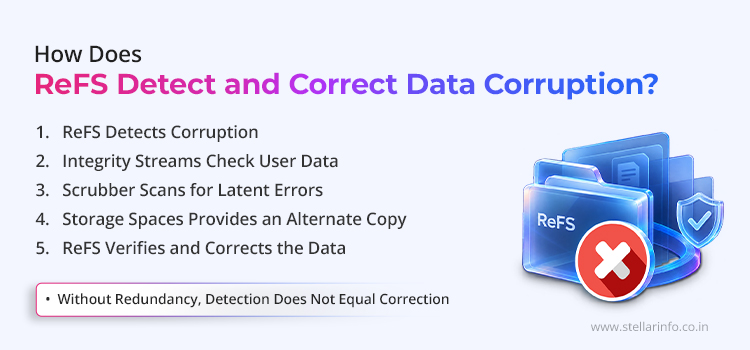
ReFS detects corruption at the file system layer, not by relying solely on the storage device. It checks metadata by default, and extends that checking to user data when integrity streams are enabled. Background scans run alongside this process, finding latent corruption before an application requests the affected data. These safeguards improve fault tolerance, but they do not remove the need for ReFS data recovery when redundancy is missing or critical metadata fails.
ReFS checks metadata on every relevant operation. Metadata records where files exist, how directories connect, which blocks belong to which object, and which parts of the volume are allocated. If metadata becomes unreliable, Windows can lose the ability to interpret the volume even when most of the underlying data still exists.
Checksums
ReFS uses checksums for metadata by default. These checksums are stored separately from the metadata they protect, which helps the file system detect whether an internal structure has changed unexpectedly. This is useful because metadata corruption can be more damaging than the loss of a single file.
Integrity Streams
Integrity streams extend checking to user data. For file contents, ReFS offers an optional feature called integrity streams. When enabled, ReFS maintains checksums for data blocks and metadata. This allows the file system to detect silent corruption, sometimes called bit rot, where stored data changes without an apparent write error.
A Trade-Off, Not a Free Feature
Integrity streams give stronger protection against undetected data corruption, but they also affect workload behaviour. They can increase write amplification and add overhead for checksum calculation. For this reason, administrators typically enable them selectively rather than across every workload.
The Scrubber
The scrubber scans for latent corruption. ReFS includes a background data integrity scanner called the scrubber. It periodically scans the volume and checks stored information before users or applications access it.
This proactive scan matters because corruption can stay hidden for months on cold data. A backup repository, archive, or virtual machine library may hold files that no one opens regularly. The scrubber gives ReFS a chance to detect corruption early and, where the storage layout allows, correct it before the next production read.
Storage Spaces Provides the Alternate Copy
Storage Spaces provides the alternate copy ReFS needs. ReFS can detect corruption on its own, but it needs a healthy alternate copy to automatically correct damaged data. This is where Storage Spaces matters.
In a mirrored or parity Storage Spaces configuration, ReFS can detect a checksum mismatch, request another copy of the affected block from Storage Spaces, verify that copy, and use it to correct the damaged area. This is the scenario Microsoft designed for online correction. It also explains why Storage Spaces failure recovery becomes difficult once the storage pool loses redundancy or when several disks fail simultaneously.
Without Redundancy, Detection Does Not Equal Correction
ReFS may know that a structure or file is corrupt, yet have no safe location from which to copy replacement data.
Copy-on-Write Against Incomplete Metadata Updates
Copy-on-write protects against incomplete metadata updates. ReFS uses copy-on-write, also called allocate-on-write, for metadata updates. Instead of overwriting an existing metadata block, ReFS writes the new version elsewhere and updates the parent reference only after that write completes.
Copy-on-write protects ReFS against torn writes during crashes or power loss. If a new write does not complete, the previous metadata state may still be valid. ReFS also uses checkpoint structures and transaction logging to help return the file system to a consistent state after an interruption.
Where Does ReFS Resilience Break Down?
ReFS resilience depends on the physical condition of the storage layer, the availability of redundant copies, and the integrity of core metadata. When any of these break down, ReFS loses its self-healing behaviour and may need specialist ReFS data recovery.
ReFS Cannot Correct Corruption on Non-Resilient Storage
The most important limit on ReFS resilience is that it is engineered to detect corruption, not to correct every instance of it. When ReFS detects a checksum mismatch on a bare disk, a basic volume, or a non-resilient simple Storage Space, it has no reliable alternate copy to draw on. It can identify that something is wrong and trigger an access error, or make the affected file unavailable, but it cannot reconstruct the block. A ReFS volume on a mirrored Storage Spaces pool, faced with the same fault, can still reconstruct that block. The file system is the same in both cases, but the fault tolerance is not.
Salvaging
Salvaging can keep the volume online while removing affected files. When ReFS encounters unrecoverable corruption, it may use a mechanism called salvaging.
During salvaging, ReFS removes the affected file or directory from the active namespace, allowing the rest of the volume to remain online. This protects volume availability, but it can surprise administrators, since a damaged object disappears rather than remaining visible as a corrupt file. From the operating system's view, that object is no longer part of the accessible directory tree. From a recovery view, some underlying metadata or data blocks may still exist on disk and may need offline analysis.
Recovery tip. Administrators should stop writing to the volume as soon as files disappear unexpectedly on ReFS. Continued use can cause the allocator to reuse areas that still contain recoverable metadata.
Storage Spaces Failure Beyond Self-Healing
ReFS performs best when Storage Spaces still holds enough healthy copies of the corrupt block to satisfy correction requests. When drive failures exceed the pool's tolerance, self-healing breaks down.
A two-way mirror tolerates the loss of one copy per block. If both copies of the same region fail, or the pool metadata becomes inconsistent, Storage Spaces can no longer return valid data to ReFS. In severe cases, Windows may show the volume as RAW or refuse to mount it. Storage Spaces failure recovery at this stage means analysing the pool layout, disk order, virtual disk metadata, and ReFS structures together.
Critical Metadata Corruption and RAW Volumes
ReFS relies on key metadata structures to locate and interpret the file system. If checkpoint areas, root object references, or major B+ tree structures become unreadable, Windows may not recognise the file system and may present the volume as RAW.
A RAW volume does not necessarily mean the data is gone. It only means Windows cannot parse the file system well enough to mount it. In this situation, data recovery specialists work to locate valid ReFS metadata pages, identify earlier checkpoints, rebuild object relationships, and extract file data without relying on the normal Windows driver path.
"No Valid Superblock" or Checksum Errors
ReFS reports "No Valid Superblock" or a data integrity checksum error. These two messages are among the most common Storage Spaces-level errors administrators search for. Both indicate that Storage Spaces cannot provide a valid copy of the metadata that ReFS needs to mount the volume, typically after multiple disk failures or pool-level corruption.
Repeated mount attempts, disk re-ordering, or a pool rebuild at this stage risk overwriting the metadata a recovery specialist would otherwise use. The pool and its disks should be preserved, imaged, and assessed before any further action.
Version Mismatches
ReFS has changed significantly since its introduction in Windows Server 2012, with new capabilities added in later Windows Server releases, including Server 2016, 2019, 2022, and 2025, as well as in Windows 10 and Windows 11. When a newer operating system mounts an existing ReFS volume, Windows can automatically upgrade it. An older Windows build may then fail to read that same volume correctly.
This creates practical risk during server migration, backup repository movement, or an in-place operating system upgrade.
Before any major change, IT teams should confirm the ReFS version, operating system support, backup status, and rollback plan. For high-value volumes, that preparation can prevent an avoidable recovery case.
How Should IT Teams Approach ReFS Data Recovery?
A ReFS incident should be treated as a storage integrity event, not a routine Windows volume issue. The first decisions an IT team makes can either preserve the recovery path or overwrite the metadata that ReFS data recovery depends on.
Before attempting anything else, IT teams should:
- Stop all non-essential writes to the affected volume. This includes creating new folders, copying test files, reformatting the volume, initialising the disk, or repeatedly attempting to mount on different systems.
- Avoid rebuilding a degraded Storage Spaces pool without first capturing its current state. A rebuild can be valid in a controlled administrative scenario, but after corruption or multiple disk failures it may propagate bad data across the pool.
- Record the environment before disconnecting disks or changing configurations. Capture the Windows Server build, ReFS version where available, Storage Spaces pool status, virtual disk layout, disk serial numbers, disk order, event logs, controller details, and recent maintenance activity.
- Identify, where possible, whether the issue affects the ReFS file system, the Storage Spaces layer, or the physical media.
When Should IT Teams Call In Professional ReFS Data Recovery Support?
IT teams should stop internal attempts and contact a professional ReFS data recovery provider when any of the following appear.
| Symptom | Why It Matters |
|---|---|
| ReFS Volume Appears as RAW | Windows cannot parse critical file system metadata |
| Storage Spaces Pool Is Failed or Missing Disks | The virtual disk may need reconstruction before file recovery |
| Files or Directories Disappeared Suddenly | ReFS may have salvaged corrupted objects from the namespace |
| Multiple Disks Show Read Errors | Continued reading may worsen the media condition or produce incomplete images |
| Backup Repository or Hyper-V Data Is Affected | VHDX, checkpoint, Veeam backup-chain, and deduplicated data all need controlled extraction |
| ReFS Reports "No Valid Superblock" or a Data Integrity Checksum Error | The Storage Spaces pool cannot supply valid metadata; further reads risk permanent data loss |
| ReFS Errors Follow an OS Upgrade | A version mismatch or a failed ReFS metadata upgrade may be involved |
What Techniques Do Professionals Use for ReFS Data Recovery?
Volume Preservation
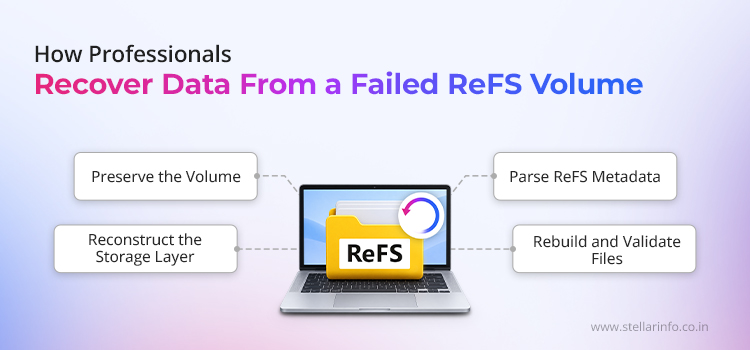
Professional ReFS data recovery starts with volume preservation. Specialists first create sector-level images of every disk, particularly when the ReFS volume resides on Storage Spaces, hardware RAID, or failing physical media. Imaging preserves the original volume and provides engineers with a stable copy to analyse.
Reconstructing the Storage Layer
ReFS metadata can only be parsed correctly once the logical data stream has been rebuilt in the right order. When Storage Spaces is involved, professionals reconstruct the virtual disk before analysing ReFS. They examine pool metadata, disk membership, slab allocation, resiliency type, interleave size, column layout, and missing-member behaviour.
Parsing ReFS Metadata Offline
Professionals scan the raw image for valid ReFS pages, including orphaned or older copy-on-write metadata that no longer appears in the active namespace.
Rebuilding Files and Validating Usable Output
After metadata reconstruction, specialists map file records to data extents and rebuild the directory structure where possible. For Hyper-V, backup repositories, or deduplicated data, they also validate recovered VHDX files, Veeam backup chains, and other large container files.
To Sum Up: Getting a Failed ReFS Volume the Right Recovery
A ReFS volume that has gone RAW, a Storage Spaces pool that has failed, or folders that have vanished without any deletion activity all point to the same next step. A controlled evaluation should come before anything else is attempted.
Stellar Data Recovery engineers assess the storage layout, media condition, ReFS metadata state, and recovery feasibility before any extraction begins. A ReFS failure is never treated as a routine Windows volume error, because a single wrong command can permanently overwrite metadata that would otherwise have been recoverable.
The window to recover data from a failed ReFS volume narrows with every write, remount attempt, and rebuild. Acting early, before the metadata is overwritten, is what separates a full recovery from a partial one.
Wondering what a ReFS specialist would recommend? Call 1800 102 3232 to find out, free of charge.
FAQs
Usually not. NTFS tools look for Master File Table records, while ReFS uses B+ tree metadata, checkpoints, and object tables.
Yes, in many cases. A RAW status means Windows cannot mount the file system. It does not prove that the underlying data has disappeared.
Often, yes. Specialists may first need to reconstruct the Storage Spaces virtual disk, then parse the file system metadata from the rebuilt logical volume.
ReFS can salvage corrupt objects by removing them from the visible namespace. They may no longer appear in Windows, but the underlying structures may still exist on disk.
No. Chkdsk is an NTFS maintenance tool and does not work the same way on ReFS. The volume should be preserved and instead given a specialist evaluation.


About The Author

Data Recovery Expert & Content Strategist