Encrypted drive data recovery is a sub-domain of data recovery in which success is largely independent of the physical condition of the drive. A drive in perfect working order may render its data permanently inaccessible, whereas a physically damaged or failing drive can, in certain cases, be recovered in full. The sections that follow set out exactly what determines that answer, tool by tool and scenario by scenario.
What Actually Decides If an Encrypted Drive Can Be Recovered?
A valid key unlocks the entire volume at once. Without one, none of the data can be read. This is what sets encrypted drives apart from most data loss situations, where partial recovery of readable fragments is common even after significant damage. Encryption removes that middle ground.
To see why this one factor carries so much weight, it helps to look at what encryption actually does to the data.
How Does Full-disk Encryption Work?
Full-disk encryption works by converting the data written to a drive into ciphertext using a symmetric cipher, almost always the Advanced Encryption Standard (AES). Once that conversion takes place, the data within those sectors becomes unreadable without the specific key used to encrypt it, and without that key, the ciphertext is mathematically indistinguishable from random noise. This is what separates encrypted drive data recovery from conventional data recovery.
How Is Encrypted Drive Recovery Different From Conventional Data Recovery?
Traditional recovery deals with damaged sectors, corrupted file systems, or accidentally deleted files. Encrypted drive recovery works differently, since the physical state of the drive has no bearing on whether the data can be read.
The encrypted data can become readable again if a valid password, recovery key, or escrowed key is located. It can also become readable if a key from an earlier session remains present in the system's memory. Where none of these exists, the encryption is functioning exactly as designed, and the data remains in its ciphertext form.
Recovery in this context is not a process of bypassing encryption through some flaw in the mathematics. It is instead a matter of using a valid key to transform the ciphertext into plaintext. Encrypted drive recovery is therefore a different problem from ransomware recovery, where the encryption is applied without the user's consent and only the attacker has the key.
Can Encryption Experts Guess a Decryption Key?
Directly guessing the key is not a viable strategy. The keyspace for AES-256 encryption is so large that exhausting it through brute force is not achievable with any amount of current computing power.
Modern full disk encryption software such as BitLocker, VeraCrypt, and FileVault runs every password attempt through a deliberately slow key derivation function (PBKDF2 or Argon2id), which applies hundreds of thousands of iterations before producing a usable key.
Even a correct password therefore takes a measurable amount of processing time to convert into the actual encryption key, and an attacker testing thousands of guesses faces that same delay on every single attempt.
Hardware introduces a second barrier against brute-force attempts to derive the decryption key. Windows devices typically rely on a Trusted Platform Module (TPM), a dedicated security chip that manages and protects encryption keys, while Apple devices use the Secure Enclave, a similar dedicated chip built into Apple silicon and the T2 security chip. Both enforce limits on failed password or PIN attempts by introducing delays and ultimately preventing further attempts after a defined threshold is reached.
How BitLocker, VeraCrypt, and FileVault Encrypt Data?
BitLocker, VeraCrypt, and FileVault are examples of sophisticated full disk encryption software. All three tools rely on a key hierarchy to encrypt data securely.
A key hierarchy is a layered encryption structure in which one key encrypts the data, and a separate key encrypts that first key. The layered process exists for a practical reason. It allows a user to change their password without having to re-encrypt the entire drive, since only the outer wrapping key needs to be replaced when a password changes.
The method each tool uses to protect its outer key is the primary factor that decides if recovery is possible after a failure.
BitLocker — How It Encrypts & Stores Keys
BitLocker is Microsoft's built-in full-disk encryption feature, available in the Pro, Enterprise, and Education editions of Windows. Understanding how it builds and stores its keys is the starting point for determining if BitLocker data recovery without key access is realistically possible in a given case.
How It Encrypts Data
BitLocker encrypts data using AES in XTS mode (XEX-based tweaked-codebook mode with ciphertext stealing), a method built specifically for protecting data at rest on a disk, using either a 128-bit or 256-bit key.
How It Stores Keys
BitLocker's key hierarchy consists of three layers:
- Full Volume Encryption Key (FVEK) — the base layer, and the key that directly encrypts every sector of data on the disk. It is generated once and remains constant for the life of the volume.
- Volume Master Key (VMK) — encrypts the FVEK, adding a second layer of protection.
- Key Protectors — the mechanisms a user or system relies on to unlock the drive. One or more key protectors secure the VMK.
The unlock process typically works as follows:
- When the device powers on, the system's firmware measures each component involved in starting the machine, including the bootloader and the operating system kernel.
- It records these measurements as cryptographic hashes inside the TPM, in values called Platform Configuration Registers (PCRs).
- If the TPM finds that these measurements match the expected, untampered state, it releases the VMK.
- The VMK then decrypts the FVEK, and the FVEK is loaded into the system to decrypt and encrypt data as it is read from or written to the disk.
- AES-NI accelerates encryption and decryption, a hardware feature built into most modern CPUs designed for this purpose.
Key protectors can include the TPM, a user-set password or PIN, a USB startup key, or the 48-digit numerical recovery password generated automatically when BitLocker is first enabled.
In practice, this recovery password is the most important fallback available in any Windows data recovery case involving a BitLocker-encrypted drive, as Microsoft backs it up automatically to:
- The user's Microsoft account
- Active Directory in domain-joined business environments
- Microsoft Entra ID in cloud-managed organisations
VeraCrypt — How It Encrypts & Stores Keys
VeraCrypt is free, open-source disk encryption software that runs on Windows, macOS, and Linux. It is the direct successor to the now-discontinued TrueCrypt.
How It Encrypts Data
VeraCrypt supports AES alongside several other ciphers, including Serpent, Twofish, and Camellia, and can combine multiple ciphers in sequence for additional protection. Unlike BitLocker and FileVault, VeraCrypt deliberately avoids any reliance on a TPM or other hardware security chip, and keeps all key material entirely software-based.
How It Stores Keys
Every VeraCrypt volume begins with an encrypted header, typically the first 512 bytes of the volume, which stores the actual keys used to encrypt the data.
To unlock the volume, VeraCrypt first reads this header and extracts a stored salt (random data combined with the password to stop attackers from using pre-computed password tables). The user's password, along with any keyfiles in use and an optional setting called the Personal Iterations Multiplier (PIM), is then run through PBKDF2 or Argon2id to derive what is known as the header key.
VeraCrypt attempts to decrypt the header using this key and confirms success by checking for a specific marker string and a checksum stored inside the header. If any single input (the password, a keyfile, or the PIM) is incorrect, the header will not decrypt, and the volume will not mount.
VeraCrypt protects the header in two ways. A backup copy is written automatically to the end of every non-system volume, and users may also export an additional backup header to an external file at any time. Recovery of a damaged VeraCrypt volume typically depends on the existence of that backup.
FileVault — How It Encrypts & Stores Keys
FileVault 2 is Apple's full-volume encryption feature for macOS, and is applied to the Apple File System (APFS) startup volume. Understanding how it builds and stores its keys is the starting point for determining what FileVault recovery MacBook cases can realistically achieve.
How It Encrypts Data
FileVault encrypts data using XTS-AES-128 with a 256-bit key.
How It Stores Keys
- The unlock process differs depending on the hardware of a particular MacBook machine.
- On older Intel-based Macs without Apple's T2 security chip, FileVault derives its protective key directly from the user's password using PBKDF2 (the same type of slow key-stretching function used elsewhere in disk encryption). The resulting key remains in regular system memory while the drive is mounted and in use.
- On Macs built with the T2 chip or Apple silicon, an additional hardware layer is introduced in the encryption and decryption process. The Volume Encryption Key (VEK), which is the key that actually encrypts data on the disk, is encrypted using a key generated inside the Secure Enclave. That key combines the user's password with a Hardware Unique Identifier (UID), a unique value fused into the chip during manufacturing. The UID cannot be read out of the chip by any software. It can only be used internally, within the Secure Enclave, to perform this single function.
The encryption-unlock design defines almost everything about FileVault recovery on modern MacBook hardware, since the encrypted drive is cryptographically tied to that one specific logic board and to no other. It is also why MacBook data recovery involving FileVault often requires component-level work rather than software-only intervention.
Apple offers three legitimate routes for encryption experts to regain access to a locked volume:
- The personal recovery key generated and shown to the user once, at setup
- Apple ID-based unlock, if this option was enabled
- An Institutional Recovery Key, used by organisations to unlock managed devices through Mobile Device Management (MDM) without needing the user's own credentials
Key Differences Among Encryption Tools That Affect Data Recoverability
All three tools offer broadly comparable cryptographic strength. Where they diverge, and where data recovery approaches and outcomes also diverge as a consequence, is in three specific areas:
- The key's dependence on hardware
- The amount of backup metadata the tool retains
- The existence of any organised system to recover a lost key
The first difference concerns the key's location. It can be bound to hardware, or it can be held purely in software.
Key Dependence on Hardware
- BitLocker follows a more flexible approach. Even though the TPM restricts release of the VMK to the system's measured boot state, an encrypted copy of the VMK is also stored in BitLocker's on-disk metadata. This means a motherboard replacement will break the TPM's automatic unlock and trigger Recovery Mode, but it does not destroy the drive, and a valid 48-digit recovery key can still decrypt that on-disk copy of the VMK.
- VeraCrypt avoids hardware binding entirely, which means a VeraCrypt volume can be moved between different machines and mounted normally on any of them, provided the correct password and keyfiles are available.
- FileVault on modern Macs binds the encrypted volume to its original logic board, because the Hardware UID needed to unlock it does not exist anywhere outside that specific Secure Enclave chip. If that logic board is destroyed, the data is lost, even if the NAND flash storage chips remain physically intact, since those chips only ever hold ciphertext with no way to decrypt it elsewhere.
Backup Metadata Retained
- BitLocker maintains three separate copies of its encryption metadata across different locations on the disk. A single damaged sector in one location therefore does not prevent the system from locating a readable copy elsewhere.
- VeraCrypt stores a primary header at the start of the volume and a backup header at the end of the same volume. If the primary header is damaged, VeraCrypt can be directed to mount the volume using the backup header instead.
- FileVault takes a different approach. Its key metadata is embedded within APFS structures and the Secure Enclave's internal key storage, known as the keybag. It provides no user-accessible backup header file.
Recovery Key Escrow Availability
- BitLocker has the most developed escrow system for recovering a lost key. Recovery keys are typically backed up automatically to a Microsoft account, Active Directory, or Microsoft Entra ID at the point BitLocker is first enabled.
- VeraCrypt has no escrow system whatsoever. There is no central authority, account, or support service that retains a copy of any VeraCrypt key. If a user never created and stored a header backup, that absence cannot be resolved after the fact.
- FileVault offers Apple ID-based recovery for individual users and Institutional Recovery Keys for organisations managing devices through MDM, but the personal recovery key shown at setup is the user's sole responsibility to store safely. Apple keeps no copy of it unless iCloud-based recovery was specifically enabled.
Encrypted Drive Data Loss Scenarios
Most encrypted drive data recovery cases fall into one of four categories.
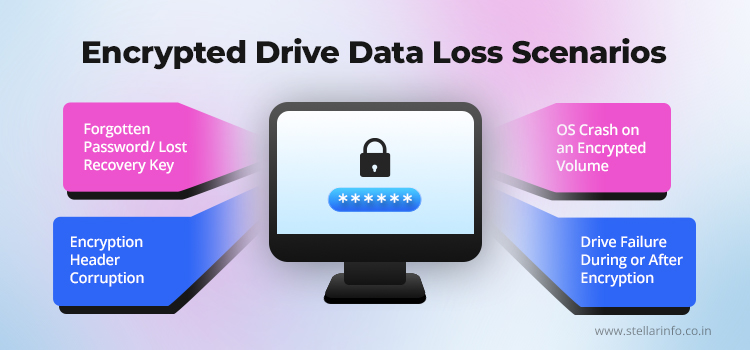
1. Forgotten Password or Lost Recovery Key
This is the most frequently seen scenario, and also the most difficult to resolve.
Without a valid password, recovery key, escrowed key, or a key still resident in system memory from an earlier session, a volume remains cryptographically sealed, precisely as the encryption was designed to enforce.
- For data recovery from a BitLocker-encrypted drive without the key, the process depends on locating an alternative protector. The first practical step is to check every plausible location for a surviving key.
- For data recovery from a VeraCrypt-encrypted drive, no fallback exists. Without the password, the keyfile, and the correct PIM value, the data cannot be recovered.
- For data recovery from a FileVault-encrypted drive on a Mac, the available routes are the personal recovery key, the Apple ID linked at setup, or an institutional key held by an organisation's IT department. The Secure Enclave will not release the encrypted VEK through any other means.
2. Encryption Header Corruption
In this scenario, the password or recovery key is valid and known, but the on-disk metadata linking that key to the actual data has been physically damaged. The volume will not mount, not because the key is wrong, but because the connective tissue between key and data cannot be read.
- The outcome differs sharply by tool. On a BitLocker-encrypted drive, partial corruption of this metadata can often be resolved using Microsoft's Repair-bde command-line tool, which uses a valid recovery password or exported Key Package to extract readable data from the damaged volume onto a separate, healthy drive. Only if all three metadata copies are destroyed simultaneously does the FVEK become permanently unreachable.
- On a VeraCrypt-encrypted drive, this is precisely the failure mode the embedded backup header exists to address. If the primary header is damaged, VeraCrypt can mount the volume using the backup header instead, with no external file required. Only if both the primary and backup headers are damaged does an external header backup file, where one was ever created, become the sole remaining route back in.
- On a FileVault-encrypted MacBook, damage to the Secure Enclave's keybag metadata typically demands specialised, lab-level diagnostics, and even then, full recovery is not always achievable.
3. Drive Failure During or After Encryption
When a drive begins to fail physically through bad sectors, a faulting controller, a head crash on a hard disk drive (HDD), or NAND degradation on a solid-state drive (SSD), the presence of encryption raises the stakes considerably.
A single bad sector landing in the header region of an encrypted volume can destroy access to all key material in one event, even where the remainder of the disk is perfectly readable.
The correct response in this scenario is to stop using the drive immediately, create a sector-by-sector image onto separate, functioning media, and perform all further recovery work on that image rather than the original drive. For BitLocker specifically, an in-progress encryption operation can be paused using Windows command-line tools, reducing read and write activity on the drive before imaging begins.
4. OS Crash on an Encrypted Volume
An operating system crash does not, on its own, damage or alter the encryption keys. What it can affect instead is the file system inside the encrypted volume, or, in BitLocker's case, the boot environment surrounding it.
- BitLocker is the most exposed to this scenario. On Windows machines using a TPM, a crash that changes the PCR measurements recorded during boot, following a failed update or an automatic Startup Repair, will cause the TPM to refuse to release the VMK on the next restart. The system then enters BitLocker Recovery Mode and prompts for the 48-digit recovery password.
- VeraCrypt is largely untouched by this failure mode, since it never ties its key material to the boot process or the operating system's startup state. A VeraCrypt volume remains mountable with the correct password and keyfiles regardless of any OS crash.
- FileVault sits somewhere in between. APFS maintains snapshots that can roll an entire volume back to a previously known-good state, and provided the FileVault keys remain unaffected, booting into macOS Recovery and reverting to one of these snapshots resolves most post-crash issues without ever touching the encryption layer.
How Encrypted Drive Recovery Actually Works?
Professional encrypted drive recovery follows an established sequence of steps, regardless of which of the three tools is involved.
1. Securing and Cloning the Drive Before Anything Else
Any drive showing signs of physical instability, such as SMART errors, unusually slow reads, or intermittent disconnections, is cloned before any further action is taken. Every additional read attempted on a failing drive increases the risk of pushing it beyond the point of recovery.
The cloning process is carried out sector-by-sector onto matched-capacity, functioning media, using a hardware imager built to work around bad sectors rather than retrying them repeatedly.
From that point forward, the cloned drive becomes the working copy used for every subsequent step. Drives with severe physical damage are handled in a cleanroom environment, since exposing internal components such as heads, motors, or platters to airborne particles can cause permanent damage to the readable surface of the disk.
The same approach applies identically to BitLocker, VeraCrypt, and FileVault drives, since the physical recovery stage happens before encryption becomes relevant at all.
2. Locating All Available Key Material
With a usable image secured, the next stage is a systematic search for every possible source of key material.
- For BitLocker, this audit determines if data recovery from a BitLocker-encrypted drive without the key is realistically possible. The audit includes the user's Microsoft account, Active Directory domain controllers, Entra ID tenants, printed recovery sheets, and any .bek recovery key files stored on USB media. It also extends to the system's hibernation file or any available memory dumps, which can occasionally retain a key still present from the last active session.
- For VeraCrypt, this includes any exported header backup file, together with the original password, any keyfiles used, and the exact PIM value chosen when the volume was created.
- For data recovery from a FileVault-encrypted Mac, the audit covers the Apple ID linked to the device at setup, the personal recovery key, typically stored in a password manager or in an organisation's internal records, and any escrow held by an MDM-managed organisation.
3. Header and Metadata Recovery: What Is Possible and What Is Not
Where valid key material exists but the on-disk metadata is damaged, the data recovery approach shifts to reconstructing, or substituting, that metadata.
- For BitLocker, this typically involves Microsoft's Repair-bde utility, used together with a valid recovery password or Key Package to extract readable data from a damaged volume and migrate it onto a functioning destination drive. The original volume is not rebuilt in place, the recoverable data is moved out of it entirely.
- For VeraCrypt, recovery is comparatively direct when the embedded backup header remains usable, since VeraCrypt includes a built-in option to mount using that backup. Where neither the primary nor the backup header on the disk is usable, an external header backup file, if the user created one, is the only remaining path.
- For data recovery from a FileVault-encrypted MacBook with a T2 or Apple silicon chip, severe damage to APFS or keybag metadata may require component-level work to restore the original logic board to a working state, since the relevant keys cannot exist anywhere outside that specific chip. Where the logic board cannot be restored, no software-based recovery method can substitute for it.
When to Bring in an Encryption Recovery Expert
The presence of a recoverable key path is rarely obvious without expert review.
Anyone confronting a locked encrypted drive should have that question answered before assuming the data is irretrievably lost, and before attempting remedial measures that could compromise a fragile chance of recovery.
Certain error messages provide diagnostic value to data recovery specialists.
| Encryption | Message or Indicator | Recovery Implication |
|---|---|---|
| BitLocker | "BitLocker waiting for activation" or "protection is suspended until key protectors are created" | Volume encryption key is stored in plaintext on disk and data is accessible without a recovery key |
| BitLocker | 0xc0210000, BitLocker key not loaded correctly | TPM failed to release the key at boot, and the 48-digit recovery password is required |
| BitLocker | 0x80280006 or 0x80280007, TPM inactive or disabled | Automatic unlock unavailable, recovery password or alternative key protector required |
| VeraCrypt | "Incorrect password or not a VeraCrypt volume" (when correct password was entered) | Header corruption is the likely cause, and data recovery depends on the backup header or an external header backup file |
| FileVault | fdesetup validaterecovery returns "false" | Recovery key does not match the current volume |
How Stellar Can Help With Encrypted Drive Data Recovery
Encryption recovery specialists at Stellar begin every encrypted drive case by auditing every location where a recovery key could plausibly exist, before any work begins on the drive. Even the slimmest possibility of recovering the key is pursued fully. The recovery work is conducted on a cloned image of the drive, so the original drive is not put at further risk.
Stellar Data Recovery experts work across all three encryption tools covered in this article, including BitLocker, VeraCrypt, and FileVault, and apply the same disciplined approach regardless of which one is involved. Every case begins with a clear assessment of what is realistically achievable before any recovery work starts, so clients are never left waiting on false hope.
Stellar also informs clients plainly when key recovery is not possible, rather than carrying out work that has no realistic chance of restoring access. This transparency extends to pricing and timelines, both of which are confirmed before any work begins.
Book a consultation with a Stellar encryption recovery specialist at 1800 102 3232 to find out what level of recovery is realistically possible.
FAQs
BitLocker data recovery without key access depends entirely on whether an alternative route to the key exists, such as a recovery key, an escrowed copy, or a key still present in system memory. Where none of these exists, there is no remaining route into the drive, and the encryption is functioning precisely as designed.
Formatting a drive does not erase the underlying data, but it can overwrite the metadata needed to locate and decrypt it, depending on how the format was carried out. A quick format is more likely to leave underlying data and key material intact than a full format. In encrypted drive data recovery, the chances of success after formatting depend on what was overwritten and how soon recovery is attempted afterwards.
Yes, in many cases. FileVault recovery on a MacBook that does not power on usually comes down to a separate hardware fault unrelated to FileVault itself. If the original logic board and its Secure Enclave chip can be restored or revived, the encryption keys remain accessible, and the volume can still be unlocked normally.
Reputable providers handle encrypted drives under confidentiality agreements and never need the data to be decrypted to assess or image it. Specialists at Stellar Data Recovery work from a cloned image rather than the original drive as part of their encrypted drive data recovery process, and decryption only happens once a valid key has been confirmed, so the original media stays untouched from start to finish.
Recovery in that situation depends entirely on whether the original primary header is still physically undamaged and readable. If the primary header has also been damaged or overwritten, no secondary source remains from which to attempt recovery.


About The Author

Data Recovery Expert & Content Strategist