When you work with mission‑critical databases, backup and recovery determine whether your systems can survive a failure or not.
In simple terms, a backup is a snapshot of your database at a particular point in time.
Recovery is the process of restoring that database to a consistent, usable state after something has gone wrong. However, a database backup process is not as simple as copy and paste of a large amount of files.
Here’s why:
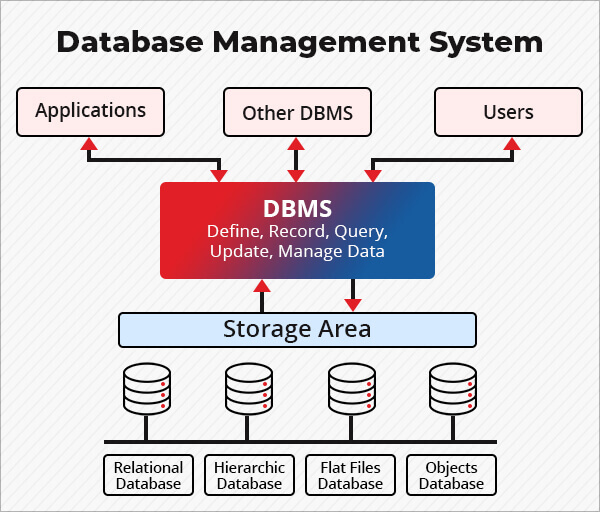
Modern DBMS platforms (such as Oracle, SQL Server, MySQL, and PostgreSQL) organize data in highly structured and interdependent ways: tables, indexes, system catalogs, and transaction logs. All of these components must be captured together and restored in a way that preserves transactional integrity—otherwise, the restored database will not be consistent or usable.
Database resilience is a matter of great importance in enterprises, because any database outage (whether caused by hardware failure, accidental deletion, or a ransomware attack) can be catastrophic and bring your operations to a halt.
So, database backups are the pillar on which an enterprise or SMB’s disaster recovery strategy stands, from a data standpoint.
At Stellar, we’ve seen firsthand that even with a backup, organizations are sometimes unable to restore their backups. In fact database recovery is not a simplistic process at all, and many of its vulnerabilities become obvious only when IT admins actually try to recover a database from a backup.
So, it helps to understand the types of database backups, how databases can be restored from a backup, and why sometimes even a backup can fail.
Database Backup Strategies & Types
Effective database backup means that you must choose the right backup method. Let’s break down the backup method taxonomy you’ll need to master:
- Full backup: This is a comprehensive snapshot of your entire database. It forms the foundation for any restore. Most organizations run a full backup weekly, especially if the database is large and the impact of downtime is significant.
- Incremental backup: This is the most storage-efficient method. Incremental backups capture only changes made since the last backup of any type. However, to restore, you need the last full, plus every incremental taken after it, which means that if even one link is missing or corrupt, the entire restoration chain will break.
- Differential backup: Instead of copying everything, a differential backup saves only the changes since the last full backup. Over time, differentials grow in size until the next full backup is taken, but they offer faster restore times than a long sequence of incrementals, because only the last full backup and the most recent differential are needed to recover.
- Transaction log backup: For databases that support point-in-time recovery, transaction log backups (like SQL Server’s LDF, Oracle redo logs, or PostgreSQL’s WAL) are critical. These logs record every committed transaction, including the order of operations. Log backups allow for precise recovery to any moment, just before failure or a malicious event.
- Snapshot backup: Snapshots are storage- or hypervisor-level, block-level copies of the database at a specific instant. Snapshots are fast and convenient, but they’re only as reliable as the underlying storage platform. Always pair them with logical/logical or full backups to ensure recovery options remain robust.
In practice, a robust enterprise backup strategy always combines these methods. For example, you might schedule a weekly full backup, daily differentials, frequent incrementals or log backups, and periodic storage snapshots.
How Restore-Based Recovery Works
A database backup is only as valuable as your ability to restore from it. Database backup recovery is a multi-step, coordinated process:
Step 1: Restore the Full Backup
You always begin by restoring your latest full backup. This provides the baseline state for the database. Depending on your platform, you may keep the database “in restore mode” (like NORECOVERY in SQL Server) so additional changes can be applied before bringing it online.
Step 2: Apply the Latest Differential Backup (if used)
If you use differential backups, you restore only the most recent differential backup taken after the last full backup. This brings the database closer to the current state without the need to apply multiple incremental steps.
Step 3: Sequentially Apply Transaction Log Backups
For full point-in-time recovery, apply each transaction log backup in sequence. These logs capture every committed change and allow you to roll the database forward to a moment just before the failure occurred—or even reverse the impact of malicious or accidental transactions. If a log in the chain is missing or corrupted, the restore process cannot continue, which is why continuous monitoring of log backup jobs is essential. In cases where the transaction log itself is damaged, you may need specialized methods to recover SQL Server database with corrupt log file before proceeding with restoration.
Step 4: Finalize the Recovery
Once all backups are applied, the DBMS runs the final processes to complete the recovery, such as “redoing” committed operations and “undoing” any incomplete transactions. These actions return the database to a transactional-consistent state.
So, it should be clear that in the real-world, restoring a database means you have to rebuild the state of a live, transactional system. If your backup set is missing a log, contains a corrupt file, or was captured during an inconsistent state (like a power outage mid-backup), you may find that restoring your database from a backup doesn’t actually get you operational.
Let’s understand why a backup-based database recovery may fail.
Why Backup Recovery Fails (Catastrophic Failures)
1. The backup itself is incomplete
Sometimes a backup job fails due to storage issues, misconfiguration, or simply running out of space. The result is that the backup doesn’t contain all the data or transaction logs needed for a successful recovery.
2. The backup is corrupted
Hardware aging, data corruption (bit rot), or interrupted writes (due to power instability) can damage the backup file itself. These errors may not show up until you try to restore your database.
3. Backup and production were on the same failure domain
A classic but still common mistake is storing backups on the same server, SAN, or cloud account as the primary database. If that system fails (such as from hardware failure, ransomware, or accidental deletion) both your production data and backups can be lost in one event.
4. Backup was logically inconsistent
If backups are taken without properly coordinating with the DBMS (for example, file-system-level snapshots without database quiescing), the backup may capture the database mid-transaction or during critical write operations. As a result, when restored, indexes and tables may become inconsistent, or the database may fail to start altogether. When this occurs in Microsoft environments, administrators often attempt to repair corrupted SQL Server database instances using native utilities before considering advanced recovery options.
5. Media/Hardware Failures
Physical failures such as multiple disk loss in a RAID array, controller failures, or cable issues can render both live and backup data unreadable.
6. Ransomware
Modern ransomware specifically targets enterprise databases and their backups. Without an immutable, air-gapped copy, you may find every recent backup is also encrypted by ransomware.
7. Human Error
Simple human errors such as overwriting backup files, mislabeling tapes, failing to update backup scripts when new databases are added are responsible for a surprising number of failed recoveries.
When these failures converge, the “restore from backup” path is closed.
The good news is that database recovery is still not impossible. At Stellar, we help hundreds of organizations recover their databases every year.
Database Recovery Beyond Backups (Professional Recovery)
When backup‑based recovery fails, it does not automatically mean your data is gone. It means the DBMS can no longer interpret the data safely, but the data may still physically exist.
This is where data recovery in DBMS has to move beyond native tools and into the domain of professional, forensic data recovery.
Working below the DBMS layer
Professional recovery operates below the database engine. Instead of asking the DBMS to restore or repair itself, specialists work directly with raw data files, storage blocks, and transaction records.
At Stellar, this work typically involves five different forensic activities:
- Binary‑level file analysis
We examine database files at the byte and page level. Even if headers or system catalogs are damaged, we can still find intact records and individual data pages that can be reconstructed.
- Page‑level reconstruction
Databases store data in fixed‑size pages. So, even if some pages are corrupted, our specialists can extract valid rows from intact pages, rebuild indexes, and reconstruct table structures.
- Transaction log parsing
Even when a database won’t mount, we know that transaction logs may still contain committed operations. By parsing these logs directly, our recovery engineers can replay valid transactions and rebuild the database state up to the last consistent point.
- Forensic carving and residual data extraction
Deleted or overwritten records leave traces in free space or unallocated regions. We have professional tools using which our experts can detect and reconstruct this residual data.
- Schema and metadata reconstruction
In severe cases, even system catalogs get damaged. Recovery then means that we have to rebuild schemas (tables, relationships, indexes, procedures) so that the recovered data can be re‑imported into a clean, stable database instance.
The key distinction here is intent.
DBMS repair tools prioritize consistency, even if that means discarding data.
Professional recovery prioritizes data preservation, and aims to extract everything that can be safely reconstructed, even when the DBMS has given up.
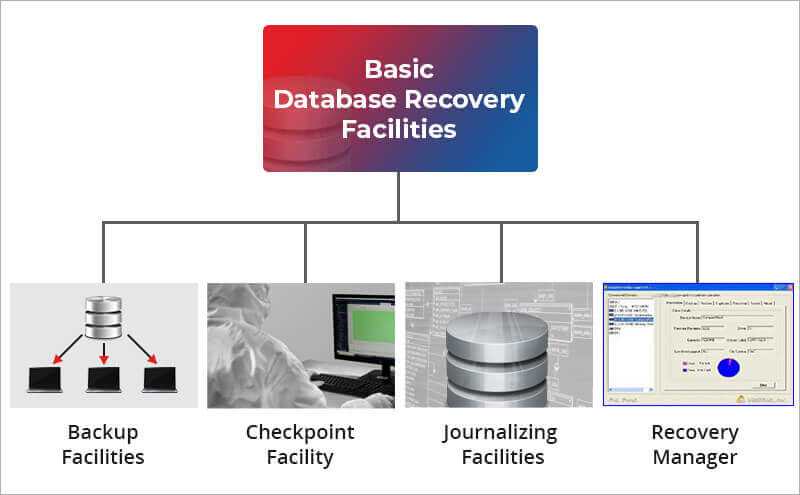
This is why database recovery facilities exist as a distinct discipline from backup administration.
When to Involve a Database Data Recovery Service, and Why Stellar?
Not every incident requires professional recovery. However, there are clear “red line” scenarios where continuing with DIY recovery attempts can permanently reduce your chances of successful database restoration. In cases involving structural corruption, engaging professional SQL database repair services may be necessary to safely reconstruct tables, indexes, and transaction logs without causing further damage.
You should involve a database backup service like Stellar immediately when:
- Backup restores fail due to corruption or missing components
- There is no usable backup or all backups are encrypted or overwritten
- The database will not start (SUSPECT / RECOVERY PENDING states)
- Transaction logs are missing or severely damaged
- Multiple disks have failed in RAID or storage arrays
- Ransomware has compromised both production and backup systems
At this stage, time matters. Every additional write, repair attempt, or overwrite can reduce recoverable data.
At Stellar Data Recovery, we approach database recovery as a forensic engineering problem. Our teams work in controlled environments, using non‑destructive methods to clone and analyze affected media before they attempt to reconstruct the database.
What differentiates Stellar is:
- Deep expertise across enterprise DBMS platforms
- Page‑level and log‑level reconstruction capabilities
- Ability to recover data even when DBMS repair tools fail
- Secure processes aligned with regulatory and compliance needs
- A clear boundary between safe recovery and destructive repair
Most importantly, we understand the emotional and operational pressure you’re under when a database fails. Our role is to stabilize the situation, preserve maximum data, and give you a clean path back to operation.


About The Author

Online Marketing Expert & Content Writer