Drive encryption involves transforming readable information into ciphertext, a process that requires a cryptographic key. Without the correct credentials, that information stays inaccessible. A stolen laptop or a removed external drive illustrates this well. Connect the device to another machine, and the result is scrambled blocks of data rather than documents that can be opened. The degree of protection also depends on the state of the device. A locked and powered-down device yields far less information to an investigator than one that is unlocked and logged in. The sections that follow examine drive encryption in digital forensics, comparing the use of a cryptographic key and a TPM with a password alone, and the impact of full-disk, volume, and file-level encryption.
What Is Drive Encryption?
Drive encryption is a security mechanism that encrypts data on a storage device, restricting access to authorised users with the correct authentication credentials or cryptographic keys. This protects the drive from unauthorised access when offline or removed from the host system.
The process works as follows.
- Plaintext → Encryption Algorithm + Key → Ciphertext
Once an authorised user or system authenticates successfully, the encrypted information can be decrypted and made available to the operating system.
- Ciphertext → Key + Decryption Algorithm → Plaintext
Why Is Drive Encryption Important?
Modern organisations hold large amounts of sensitive information on endpoints, servers, external drives, and cloud-connected storage systems. A device that has been compromised or stolen therefore becomes a major source of data exposure.
Without encryption, an attacker who removes a storage device from a computer may attach it to another computer and attempt to read the information stored on it. Encryption prevents this outcome. This protective role is precisely why drive encryption in digital forensics has become such a significant consideration for investigators, since a properly encrypted device can withhold its contents even from an examiner working with lawful access to the hardware.
Encryption does not protect against every type of attack. If an attacker has already compromised a system with an unlocked encrypted volume, they can interact with files through the operating system without breaking the underlying encryption. This distinction matters for SOC analysts.
Encrypted when off does not mean safe from every attack while on. Drive encryption therefore does not remove the need for endpoint monitoring, authentication logs, process telemetry, file access events, malware detection, and other security controls.
How Does Drive Encryption Work?
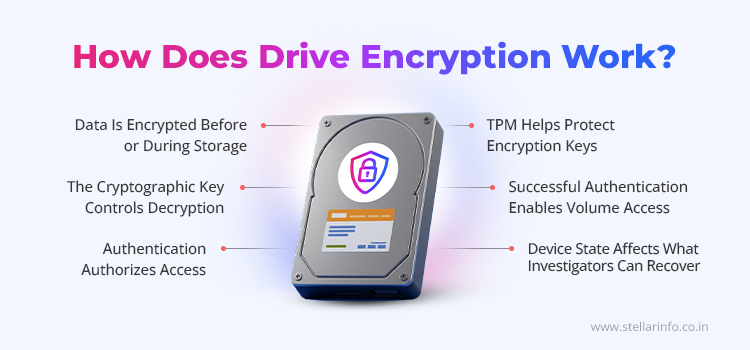
Drive encryption generally combines several components that work together, including the data, the encryption algorithm, the cryptographic key, the authentication mechanism, and, in some cases, hardware-backed security such as a Trusted Platform Module (TPM).
Data Is Encrypted Before or at Rest
The cryptographic algorithm and key work with the data when it is written to an encrypted storage medium. As a result, the original readable content is replaced with ciphertext on the media. The data's physical existence on the storage medium is not eliminated by encryption. Rather, it modifies the data so that decoding without the correct key becomes computationally infeasible. Because of this, a forensic investigator might get a whole picture of an encrypted drive as part of drive encryption data recovery, but the contents of specific files often stay out of reach.
The Cryptographic Key Controls Access
The cryptographic key is central to the encryption process. A user's password or PIN should not automatically be treated as the encryption key. Depending on the implementation, authentication credentials may unlock or derive protected key material, or they may authorise access to it.
Authentication Grants Entry
Modern encryption systems usually link some form of authentication to access for protected storage. Depending on the platform, this authentication may take several forms.
- Passwords and PINs
- Recovery keys
- Cryptographic security tokens
- Hardware-backed credentials
- Biometric authentication
- Enterprise authentication methods
TPM Secures Encryption Keys
A TPM is a hardware security component that helps protect cryptographic keys. It can generate and safeguard cryptographic keys, and bind key use to specific platform measurements. A protected key is not released unless the expected hardware or software conditions are met.
This is the approach used by technologies such as BitLocker, which performs best when paired with a TPM. A TPM can also help determine whether a device has been tampered with while offline.
Successful Authentication Decrypts the Volume
After successful authentication and key authorisation, the operating system can access the protected volume. The system does not always decrypt the entire drive into a separate permanent copy. Instead, individual blocks can be decrypted on access, allowing applications to work with readable data while the storage media remains encrypted during normal use.
Device State Affects What Investigators Can Recover
The state of a device significantly shapes the results of drive encryption in digital forensics. If an encrypted system is powered down, an investigator may obtain only ciphertext and a limited amount of directly interpretable information from storage.
An authenticated and unlocked system, by contrast, may expose accessible files, mounted volumes, running applications, memory contents, authentication artefacts, and other information not available in the same form after shutdown. Device state is therefore an important factor when responding to an incident. SOC personnel and forensic investigators should document whether a system is in one of the following states.
- Locked and powered off
- Encrypted but mounted, logged on, or hibernating
- Connected to a network
- Running active suspicious processes
Types of Drive Encryption
There are three main approaches to storage encryption.
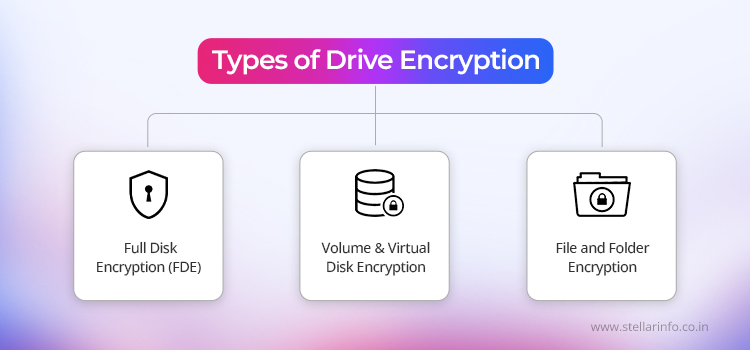
Full Disk Encryption (FDE) protects an entire physical storage device or the relevant system storage area, so removing the drive and connecting it to another system does not make the data usable.
- Suits laptops, workstations, and mobile systems where physical theft or loss is a major concern.
- Complicates offline acquisition from a forensic standpoint, since the physical image may contain encrypted blocks instead of directly accessible files.
- Exposes investigators to BitLocker-encrypted Windows volumes during endpoint acquisition.
Volume and Virtual Disk Encryption protects a specific logical volume rather than every storage area on the physical device, and virtual disk encryption applies the same principle to virtual storage environments. This approach suits organisations that want different protection policies for different storage areas. During a SOC investigation, it is important to identify which volumes were encrypted, since an apparently accessible device may still contain protected volumes that require additional authentication or key material.
File and Folder Encryption protects individual files or folders instead of an entire storage volume. This approach encrypts sensitive documents while leaving other files readable. The trade-off is a narrower scope of protection than full-disk or volume encryption offers. Unprotected items, such as temporary files, metadata, cached content, or application artefacts, can remain outside the encrypted files. Forensic investigators need to understand the scope of encryption in use and should not assume that an encrypted file means the entire device is protected.
Full Disk vs Volume vs File Encryption
The table below compares full-disk, volume, and file-level encryption, showing how each type affects data recovery from an encrypted drive and the effort required during a forensic investigation.
| Type | What It Protects | Typical Use Case | Forensic Impact |
|---|---|---|---|
| Full Disk Encryption | Entire physical drive or system storage area | Laptops, workstations, mobile devices | Complicates offline acquisition, as blocks may be unreadable without the keys |
| Volume or Virtual Disk Encryption | A specific logical volume or virtual disk | Organisations running mixed protection policies | Requires identifying which volumes carry protection |
| File or Folder Encryption | Individual files or folders | Protecting specific sensitive documents | Narrow scope, so other artefacts may remain exposed |
Software-Based vs Hardware-Based Encryption
Drive encryption can be performed by software, hardware, or a combination of both.
- Software-based encryption: the operating system or security software performs cryptographic operations and controls access to encrypted storage.
- Hardware-based encryption: the storage device or platform performs encryption internally. Self-encrypting drives (SEDs), for example, carry out encryption within the storage device.
Hardware-backed security may also include TPMs, which protect key material or release it based on specified platform conditions. This distinction matters for forensic analysis, since the examiner needs to know where encryption occurs and where the keys or authentication controls are stored, and tools such as Stellar Digital Forensics Software are built to work within that distinction during an investigation.
Conclusion: Where This Leaves You
When a valid key, password, or recovery credential is lost, corrupted, or associated with a damaged disk, encryption changes what forensic investigators and SOC teams can retrieve from a device, but it does not eliminate the need for appropriate data recovery from an encrypted drive.
Stellar Data Recovery Professional works within these authorised scenarios, supporting recovery from BitLocker-encrypted Windows volumes, RAID arrays, NAS systems, and virtual storage environments where the underlying data structure has been damaged, or the storage medium has failed. Stellar Digital Forensics Software complements this on the examination side, helping investigators work with the same encrypted environments during an active case. This is not a bypass of encryption, but a recovery path for cases where the correct credentials exist yet the drive, array, or volume can no longer be accessed through normal means, due to corruption, hardware failure, or file system damage.
Encrypted or complex storage cases can be discussed directly with the Stellar Data Recovery team to determine the right recovery approach.
Want to explore encryption and encrypted storage in more detail? Explore these related guides to learn more about encryption technologies, encrypted drives, and data recovery.
FAQs
Yes. Encryption does not delete data that has been removed from the storage medium. It only changes how that data can be read. Recovering these deleted files, as part of drive encryption data recovery, still requires access to the encrypted data, and success depends on the storage technology, the encryption method used, and the drive's condition.
The underlying cryptographic principles remain the same, but SSDs introduce additional factors such as TRIM, garbage collection, wear levelling, and over-provisioning. These processes can affect the durability and recoverability of deleted data.
Key handling depends on the architecture. In some systems, encryption keys are stored separately from the physical storage media. Hardware-based encryption can also manage keys internally within the storage device. Replacing a drive, therefore, does not necessarily mean an organisation has lost all authorised recovery capability.
Drive encryption is used mainly for data at rest, particularly in the event of a lost or stolen device. Ransomware can execute after a user has authenticated and an encrypted volume has been unlocked, allowing it to alter or encrypt accessible files. Thus, encryption must be combined with endpoint protection, backups, access controls, and SOC monitoring.
The device state, encryption technique, storage type, authentication status, available recovery credentials or keys, acquisition method, device identifiers, forensic hashes, and actions taken during inspection should all be documented by investigators. Documenting these specifics promotes repeatability and evidential integrity while helping determine how the evidence was obtained.


About The Author

Digital Forensic Specialist & Analyst