A ransom note appearing on screen tends to make one question feel more urgent than any other.
- Is the data gone for good,
- Or is there still a way to recover it?
The honest answer is that there is no fixed rule either way. It depends on specific, identifiable technical conditions that are usually already fixed by the time the note appears on the desktop.
How the ransomware encrypted the files, the shape of the backups, and how much of each file was actually affected by the encryption process all play a role in the outcome. Some of these factors are within an IT team's control in the first few minutes after discovery. Others were decided the moment the attacker's code started running.
Understanding which category a given case falls into makes the difference between wasting critical hours on the wrong approach and having a genuine chance to recover files after a ransomware attack.
What Happens During a Ransomware Attack?
Modern ransomware does not encrypt every file on a system. It targets specific file types and deliberately excludes core system files. Encrypting the operating system would crash the host before the encryption run could finish, so attackers keep the system stable long enough to complete the job on high-value files.
The Four Stages of a Ransomware Encryption Attack
The post-access execution chain of a ransomware attack runs in four stages. Each stage has direct implications for whether data can be recovered afterwards.
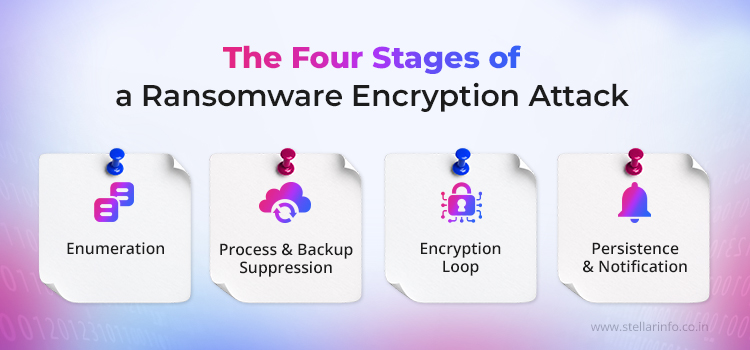
- Enumeration: The malware performs comprehensive scans across all local drives, mapped network shares, and mounted volumes, subsequently generating a prioritised target inventory stratified by file extension. Contemporary variants such as BlackCat (ALPHV) implement configurable inclusion and exclusion protocols. Precedence is accorded to high-value file formats including .sql, .pdf, .docx, and .pst, whilst system-level files are systematically excluded from enumeration scope.
- Process and Backup Suppression: The ransomware enumerates running processes and terminates any process that holds exclusive file handles to the target data. Database engines (SQL Server, MySQL, Oracle), mail stores (Exchange, IMAP services), and backup agents are the standard targets. Without this step, files kept open by these services would return sharing-violation errors and be skipped by the encryption loop. The ransomware then disables security tools by terminating services, modifying the registry, or manipulating tokens.
- Encryption Loop: The ransomware generates a fresh symmetric session key to encrypt the contents of each file on the target list. It then encrypts the session key using the attacker's RSA public key and appends the result to the ciphertext as a metadata blob. The attacker alone retains the matching RSA private key.
- Persistence and Notification: Most ransomware completes its encryption objective in a single execution. However, many variants also modify registry files to ensure the malware can resume its operations if a machine is rebooted. The ransomware then writes the ransom note to every affected directory and sets it as the desktop wallpaper.
A ransomware variant uses one of two file-handling techniques, and the technique used determines how a data recovery engineer approaches the case.
Copy-then-delete Method (used by most variants)
- It reads the original file.
- It writes a new, encrypted file to the disk.
- It deletes the original file.
On an HDD, deleted data physically remains on the platter until new data overwrites the same location. This gap between deletion and physical overwriting gives data recovery engineers a window to recover the original content through a process called file carving.
In-place Overwriting Method
- It opens the original file in large chunks, commonly 512 KB.
- It encrypts the contents of each chunk.
- It writes the ciphertext to the same physical sectors.
File carving is not possible in this scenario because the original data is physically overwritten by ciphertext during encryption.
What Are the Ransomware Encryption Types and How Do They Affect Data Recovery?
The cryptographic design used by a ransomware variant determines whether decryption without the attacker's key is mathematically feasible.
Symmetric Encryption (AES, ChaCha20, Salsa20)
Symmetric encryption relies on a single key to both lock and unlock data. Why do ransomware operators favour it? Because it handles large volumes of files fast, and most variants settle on 256-bit keys, a length that puts brute-force attacks well beyond what current computing power can manage. So where does that leave recovery? There is one narrow window: extracting the session key from the system's RAM while encryption is still running. That window only exists if a specialist can reach the infected machine during the attack itself, not after. Once encryption finishes, the operating system overwrites that memory space, eliminating any chance of recovering the key.
Asymmetric Encryption (RSA-2048, RSA-4096)
Think of asymmetric encryption as a two-key system. The mathematics ties them together: one key is public and used to encrypt the data, while the other remains private and is used to decrypt it. For recovery to happen, engineers need that private decryption key. The problem is where it lives. The attacker keeps it exclusively on their command-and-control infrastructure, nowhere else. Even if you had unlimited computing power, brute-forcing RSA-2048 would take an estimated quadrillions of years on conventional hardware — a timeframe so large it might as well be impossible. The reality is simple: without the attacker's private key in your hands, correctly implemented asymmetric encryption cannot be broken, and the data cannot be recovered.
Hybrid Encryption (the Modern Standard)
Hybrid encryption combines both methods. A symmetric key encrypts the file contents for speed, and that symmetric key is then encrypted with the attacker's RSA public key for control. The encrypted symmetric key sits alongside the ciphertext on disk. LockBit, Qilin, BlackCat, and nearly all current ransomware operations run on this model.
So when does recovery become possible under hybrid encryption? Three situations open a path. A flaw exists somewhere in the ransomware's implementation. The attacker's private key gets leaked or seized by law enforcement. Or only part of each file was encrypted, leaving the rest of the original content still readable on disk.
What Should You Do Immediately After a Ransomware Attack?
Every extra minute a network stays connected, or a disk stays powered on, reduces the evidence available to a recovery lab. Follow these steps in order.
- Disconnect the machine from the network first to prevent the ransomware from spreading to other systems.
- Decide on power next. Keep the system running in its isolated state if a professional recovery lab will be engaged, as RAM may still contain a recoverable encryption key. Power off only if no specialist is reachable and encryption is visibly still running, to halt the loop and preserve any files not yet affected.
- Remove the hard drive without reconnecting it to any network.
- Connect the removed drive to an isolated workstation using a write-blocker or read-only adapter, then examine which files have been encrypted.
- Create a sector-level backup of the affected drive before any recovery work begins.
For deeper guidance on building a resilient backup architecture that withstands ransomware attacks, see Stellar Data Recovery's backup and disaster recovery guide.
When Ransomware Data Recovery Is Not Technically Possible
Some scenarios cannot be reversed by any recovery lab, regardless of the expertise applied.
Wiper Malware Disguised as Ransomware
NotPetya is well-documented. It encrypts the Master File Table with Salsa20, then deliberately erases the encryption key from disk during execution. The ransom note is a decoy, as decryption is never possible for anyone, including the attacker. Ranscam skips encryption entirely and deletes files on installation whilst displaying a ransom note. Overwriting the Master Boot Record or GUID Partition Table destroys the partition layout needed to locate data, leaving the disk structurally unreadable.
In-Place Encryption on Solid-State Drives
SSDs use TRIM and wear-levelling at the controller level to erase data blocks, independent of the file system. Once TRIM processes a deleted or overwritten block, the flash cells are cleared, and file carving cannot recover anything from that block. Ransomware using copy-then-delete methods would leave recoverable remnants on an HDD, but nothing usable on an SSD once garbage collection completes. The cipher strength becomes irrelevant when no original data remains to decrypt.
Strong Hybrid Cryptography Combined With Complete Backup Destruction
Modern Conti uses correctly implemented AES-256 for file contents and RSA-2048 or RSA-4096 for key wrapping. This combination cannot be broken by any known method. If backups have also been encrypted or deleted alongside production data, no recovery path exists without the attacker's private key. At that point, priority shifts to incident response, regulatory notification, and system reconstruction.
When to Contact a Professional Ransomware Data Recovery Service
A professional ransomware decryption service in India becomes necessary in four scenarios.
Partial or Intermittent Encryption Affecting Business-Critical Files
When LockBit 3.0 encrypts only 16 bytes out of every 512, or when BlackCat applies intermittent encryption to certain file types in its Auto mode, most of each file remains intact on disk. Professional labs use file-signature analysis and format-aware reconstruction to salvage usable content from the unencrypted segments.
Complex Storage Infrastructure
RAID 5, RAID 6, NAS, and SAN environments require manual reconstruction of stripe layouts and parity before recovery work can begin. Generic data recovery utilities frequently destroy what remains by attempting an automatic rebuild that does not match the original array configuration. Stellar server data recovery and NAS data recovery services exist for exactly these cases, where the wrong intervention causes more damage than no intervention at all.
Database Stabilisation
SQL Server, MySQL, and Tally ERP databases are particularly vulnerable to partial encryption because their internal page structures break catastrophically when even small sections of the file are corrupted. Professional data recovery engineers use proprietary tools to rebuild broken internal references and stabilise the database files enough to load and export the surviving records.
High-Stakes Situations Where Ransom Payment Is Under Consideration
In healthcare, manufacturing, and financial services, the cost of prolonged downtime can exceed the ransom amount within days. Even when payment becomes a serious option, a professional lab should verify whether the attacker's proof-of-life decryption sample actually works on a representative file set, and confirm that the final decryption process will not cause further damage. The ransomware data recovery service at Stellar Data Recovery is built to provide that assessment before any payment decision is made.
Ransomware Variants Stellar Data Recovery Has Recovered Data From
Stellar Data Recovery has over thirty years of experience in data recovery, spanning legacy ransomware families, mainstream commercial variants, and current ransomware-as-a-service operations. Variants successfully recovered include:
LockBit (through 3.0 and 3.2), BlackCat (ALPHV), Conti, Hive, Phobos, Makop and its MKP offshoots, STOP/DJVU, Dharma and CrySis, GandCrab, WannaCry, Locky, CTB-Locker, CryptoLocker, Petya, NotPetya, Cerber, BlackBit, Weaxor, Qilin, Wallet, Onion, Satana, and Critroni.
Detailed case studies covering SSDs, RAID arrays, NAS servers, virtualised environments, and database servers are available on the Stellar Data Recovery website.
What Determines Whether a Specific Ransomware Strain Is Recoverable
Ransomware is grouped into families, such as LockBit, Akira, and Conti, and individual strains or versions within those families, such as LockBit 3.0 or Conti v3. Identifying the family provides a first approximation of the available recovery options, but the real determinants lie at the strain and implementation levels.
Recoverability depends on three underlying factors:
- Cryptographic implementation quality — whether key generation is sound, whether nonces are unique, and whether keys ever reach disk in a recoverable form.
- Encryption logic — full encryption leaves nothing to salvage, while partial encryption leaves most of the original data intact.
- State of backups — whether they were isolated, immutable, and in place before the compromise occurred.
| Family / Variant | Crypto Method | Encryption Logic | Recoverability Status |
|---|---|---|---|
| Conti | AES-256 / ChaCha20 | Full | Low. Requires clean backups. |
| Akira | AES-256 / RSA-4096 | Configurable percentage | Moderate. Carving possible on partial files. |
| Phobos | AES-256 | Full | Moderate. Free decryptors exist for certain older variants with known implementation weaknesses. |
| LockBit 3.0 | AES + RSA hybrid | Partial (16 of every 512 bytes) | Moderate. Reconstruction viable on large files. |
| STOP/DJVU | Salsa20 + RSA | Full | Variable. Older offline-key variants are partially decryptable. |
How Can You Recover Data From LockBit, Akira, Qilin, and Other Active 2026 Ransomware Strains?
For every additional second that a network remains operational or a disk remains active, the evidence artefacts that a professional recovery lab would use continue to degrade. The actions taken by a system administrator in the first minutes after discovering a ransomware attack affect how much data can be recovered later on. The following steps should be executed in order.
- LockBit runs a mature ransomware-as-a-service model with strong hybrid encryption, aggressive backup destruction through WMI and VSS deletion, and double extortion through data exfiltration. Its partial encryption strategy, which touches only short segments at regular intervals, leaves room for recovery work, particularly for RAID-hosted databases and virtual machine disk files.
- Qilin, including the Rust-based Qilin.B variant, uses AES-256-CTR or ChaCha20 with RSA key wrapping. No public decryptor exists. Recoverability depends on storage type, backup posture, and whether encryption was partial. Stellar engineers have used file carving and format-aware reconstruction to recover significant portions of affected data in several Qilin cases, particularly on complex storage stacks.
- Akira uses native OS cryptographic libraries, CryptoAPI on Windows and Crypto++ on Linux, in a hybrid model. Early versions had implementation weaknesses that Avast exploited for a free decryptor in 2023, but later versions hardened key generation. Current Akira builds are generally non-decryptable without the attacker's private key.
The wider family list, including Phobos, Makop, STOP/DJVU, BlackCat, and Conti, accounts for most of the incidents Indian businesses bring to a ransomware decryption service in India. The approach Stellar Data Recovery engineers take is shaped by the specific implementation of the variant in each campaign, not by the family name alone.
How to Identify a Ransomware Strain
Two indicators help engineers narrow down the analysis and determine the ransomware variant.
File extension appended to encrypted files. Each ransomware family uses a characteristic suffix, which can help identify the strain.
| File Extension | Ransomware Family |
|---|---|
| .lockbit | LockBit |
| .BlackBit | BlackBit |
| .ALPHV / random 7-character string | BlackCat (ALPHV) |
| .phobos / .eking / .eight | Phobos |
| .mkp / .makop | Makop |
| .WNCRY | WannaCry |
| .ecc | TeslaCrypt |
| .85f0 (or similar 4-character hex) | Cerber |
| .weaxor | Weaxor |
| .qilin | Qilin |
Windows Event Viewer logs under Microsoft Defender Operational. Certain Event IDs indicate the nature of the ransomware variant:
- 1006 — malware detected
- 1116 — platform-level detection
- 1127 — Controlled Folder Access blocked a process from modifying disk sectors
The Ransomware Data Recovery Process at Stellar Data Recovery
The ransomware data recovery process at Stellar is performed within an ISO 9001 and ISO 27001-certified environment and follows five stages.
- Variant identification and scoping. Engineers examine the affected media to identify which ransomware variant is involved and how much data has been encrypted. Each variant handles encryption and files differently, so identifying the right one determines everything that follows.
- Sector-level cloning. Before touching anything else, engineers create an exact byte-for-byte clone of the affected media. All recovery work happens on the clone. The original remains untouched, preserving the evidence trail and allowing engineers to try multiple approaches without risking further damage.
- Low-level structural analysis. Engineers map out which sectors got encrypted, which stayed intact, and what happened to the file system. In partial encryption cases, which now account for most enterprise attacks, this shows how much usable content remains and where it sits on the disk.
- Reconstruction. Engineers scan the cloned disk for intact file signatures in sectors the encryption missed and carve recoverable files from unallocated space. When encryption only affects the file headers, they rebuild those headers manually using format-specific knowledge. For SQL Server, MySQL, and Tally ERP databases, they fix broken references and rebuild allocation maps to stabilise the files. If the file system is too corrupted for standard tools, they run RAW recovery instead, which identifies files through their binary signatures rather than file system metadata.
- Validation and delivery. Engineers load the recovered data back into its original application and run checks to confirm files open correctly, records are complete, and internal references work as expected.
Stellar Data Recovery Can Help You Recover Files After a Ransomware Attack
The window that determines how much data can be saved is measured in hours, not days. What gets touched, powered off, or rebooted in that time often matters more than the ransomware variant itself.
Stellar Data Recovery has worked on ransomware cases across every major variant, storage type, and infrastructure setup covered in this guide, from single workstations to multi-disk RAID arrays and virtualised production servers. Every case runs on a sector-level clone inside an ISO 9001- and ISO 27001-certified environment, so the original drive is never touched, and no option is closed off before it has been properly assessed.
If your business has been hit, the next call matters more than the last few hours did. Reach a Stellar Data Recovery ransomware specialist at 1800 102 3232 for a no-obligation assessment, and give yourself the best chance to recover files after a ransomware attack before you decide on next steps.
FAQs
A single drive with partial encryption can move from intake to delivery within a week. Multi-disk RAID arrays, NAS units, and virtualised workloads typically require two to four weeks, as each member drive must be cloned and the array reconstructed before file-level work can begin. Database stabilisation cases take even longer, since each major database file requires its own validation cycle to confirm that the recovered records are functional.
Most cyber insurance policies cover professional data recovery and incident response costs, though specifics vary between providers. Ransom payment coverage has tightened and often requires pre-authorisation. Before engaging a recovery provider, check the policy for required vendor panels, notification deadlines, and documentation standards. An insurer can void a claim if its notification process is not followed.
Yes. Cloud sync services automatically replicate local changes to the cloud, so an encrypted local file replaces the cloud copy during the next sync cycle. Most major sync services offer version history that retains previous versions of each file for a set period, enabling file-by-file restoration. Restoring thousands of files individually is impractical at enterprise scale, so a dedicated cloud backup solution is a more reliable option for large environments.
Disconnecting the machine from the network should always be the first step to prevent lateral spread. The decision to power off comes second and depends on recovery priorities. Leaving the machine on preserves the contents of volatile memory (RAM), which may contain an encryption key that a professional lab can extract. Powering off halts the encryption loop but permanently destroys any key material held in memory. Contact a professional recovery service before making the power-off decision if one is reachable, and power off only if encryption is visibly ongoing and no specialist is available.
Payment does not guarantee recovery. Industry reports from Sophos and Coveware consistently show that a significant proportion of victims who pay the ransom receive no working decryption key, a key that only partially decrypts the data, or a decryptor with bugs that corrupt files during decryption. Contact Stellar Data Recovery before making any payment decision. The engineering team can test the attacker's proof-of-life decryption sample on a representative file set and outline realistic recovery options for the specific case.


About The Author

Data Recovery Expert & Content Strategist