Summary: Sparse virtual disks expand on demand rather than reserving their full size upfront. This guide explains how this allocation mechanism works, compares the structural differences between VMware's Virtual Machine Disk (VMDK) format and Hyper-V's Virtual Hard Disk (VHDX) format, examines how each format behaves when deployed on a RAID array, and covers the recovery options available when sparse file corruption occurs.
Every virtualisation deployment faces the same operational tension. Generous provisioning accommodates growth but leaves physical capacity sitting idle. Conservative provisioning preserves storage efficiency, but available headroom runs out quickly. Sparse format resolves this constraint.
A sparse virtual disk occupies only the space the guest operating system has written to it. A 100 GB disk containing a 20 GB operating system occupies approximately 20 GB of storage in the datastore, leaving the remainder available for other virtual machines. The advantages of this approach are considerable. The trade-offs are equally significant, and both become apparent when the storage layer experiences failure.
Understanding how sparse format operates and where it introduces risk is therefore essential for any administrator responsible for managing virtual infrastructure.
What is a Virtual Disk Format?
A virtual disk format is a file, or sometimes a small collection of files, that the hypervisor presents to a guest operating system as a physical storage device. The guest operating system recognises a SCSI or SATA controller. The disk is fundamentally a container residing within a larger host file system, a detail that remains transparent to the guest and requires no guest-level awareness.
Every element a physical drive contains exists within that container: partition tables, master boot records, file systems, and user data. The storage location varies by platform. VMware places these files on the Virtual Machine File System (VMFS), whilst Hyper-V uses NTFS or the Resilient File System (ReFS). Regardless of the platform, the format determines how the guest's read and write operations translate into actual operations on the underlying physical disk.
What is Sparse Format?
A sparse disk allocates storage dynamically, claiming space on the array only as the guest writes data to it. This stands in contrast to a thick-provisioned disk, also referred to as a flat disk, which claims its entire allocated capacity at creation and zeroes every block on the array before any guest data arrives.
A brief clarification on terminology is worth noting here. Sparse and thin provisioning refer to the same underlying concept: capacity is allocated on demand and expands as data accumulates. When discussions compare "sparse versus thin provisioning," they typically contrast one vendor's sparse format with another vendor's thin format, rather than describing two different allocation strategies. The distinction that actually matters for capacity planning is between sparse or thin provisioning on one side and thick or flat provisioning on the other.
How Sparse Disks Allocate Space on Demand?
When a guest application issues a write operation, the hypervisor intercepts it, determines the logical location for that data, appends it to the end of the host file, and updates an internal metadata table to associate the guest's logical sector with its new physical offset. Logical blocks rarely occupy contiguous physical order, which is an inherent consequence of on-demand allocation.
When a file is deleted in the guest, the corresponding host file does not shrink. The hypervisor marks the underlying blocks as available for overwriting, yet a separate reclamation process is required before that space is released on the host.
Sparse VMDK (VMware)
In a production VMware environment, a sparse VMDK consists of two components: a text descriptor file that specifies the disk geometry, and one or more extent files containing the binary data. From the descriptor, a chain of pointers extends downward through the grain directory and grain tables to the data blocks themselves, referred to as grains. By default, each grain measures 64 KB.
Two variants exist in production environments. Monolithic sparse consolidates all data into a single contiguous file and represents the standard configuration for most production systems. Split sparse segments the disk into 2 GB extents and is retained solely for backward compatibility with legacy file systems that cannot accommodate large individual files.
Sparse VHD/VHDX (Hyper-V)
The Microsoft equivalent underwent a significant generational transition. The legacy VHD format is limited to 2 TB capacity. VHDX raised this ceiling to 64 TB and introduced a Block Allocation Table to track data states throughout the structure.
One additional characteristic of VHDX is relevant to storage planning. Its physical sector size aligns to 4 KB, matching the specification of modern advanced-format drives and reducing write amplification. Block size refers to the unit of storage that VHDX uses each time it expands, and it defaults to 32 MB on dynamic disks. Larger blocks require less metadata overhead but expand in coarser increments. Microsoft recommends reducing this figure to 1 MB for Linux guests.
Sparse vs Flat/Raw Format Comparison
Flat disks reserve full capacity at creation time. A 50 GB flat disk immediately consumes 50 GB of datastore space, regardless of the storage consumed within the guest. The hypervisor zeroes every block during creation, which is why provisioning a large flat disk is time-intensive.
The operational implications of sparse format, by comparison, are as follows:
- Initial space consumption remains minimal, expanding only as data is written.
- Deployment is rapid, as the block-zeroing phase is not required.
- Metadata overhead is higher due to constant allocation table updates.
- Logical fragmentation across the host file system increases progressively over time.
- Unused physical capacity remains available for other workloads.
The following table summarises the distinction between sparse and flat formats:
| Feature Category | Sparse Format (Dynamic) | Flat Format (Fixed) |
| Initial storage usage | Minimal; expands with writes | Maximum; the total allocated size |
| Metadata overhead | High; constant allocation table updates | Low; mapping is static |
| Provisioning speed | Fast; writes metadata only | Slow; zeroes every block |
| Fragmentation risk | High; expands organically | Low; contiguous allocation |
How Sparse Disks Interact with RAID?
Most production virtual machines operate on RAID arrays rather than single drives, and it is on these arrays that sparse expansion begins to impose a measurable performance cost.
As a sparse file grows, the hypervisor requests new blocks from the host file system, and the RAID controller distributes them across the array. On a parity array such as RAID 5 or RAID 6, each small sparse write initiates a read-modify-write cycle: the stripe is read, parity is recalculated, and the result is written back. Sparse files expand in small increments, and what accumulates over time is a continuous stream of random write operations.
After extended production use, a sparse file becomes scattered across the RAID stripes. A single sequential read operation inside the guest can translate into dozens of random reads at the hardware level. Storage administrators typically align three values to minimise this effect, namely the guest cluster size, the hypervisor block size, and the physical RAID stripe size. When these parameters do not align, writes overlap and the overhead compounds. The most significant problems arise when the underlying RAID array begins to degrade.
When Sparse Format Causes Data Loss
The same metadata structures that enable dynamic allocation also introduce specific failure modes.
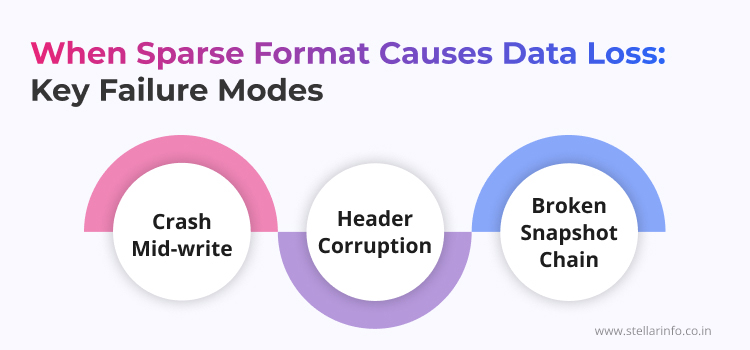
- Crash Mid-write: A sparse file appends fresh data to its end and updates the allocation tables as a separate step. If the host loses power between those two actions, the data remains physically present on disk, while the hypervisor has no mapping to access it. This is orphaned data, and recovering it calls for sector-level work.
- Header Corruption: Once the grain directory becomes unreadable, the hypervisor flags the entire virtual disk as invalid, and the machine refuses to boot.
- Broken Snapshot Chain: The mechanism differs by vendor, with delta VMDKs on VMware and AVHDX differencing disks on Hyper-V, yet the same principle applies to both: each snapshot is a thin, sparse file recording the changes made since its parent. Sever one link and everything below it loses its bearings.
A degraded physical RAID considerably compounds these logical failures. A failed rebuild performed on an already fragmented sparse file results in simultaneous physical sector damage and logical fragmentation. Standard file system checks within the guest are of no use in such cases, as the host file itself has already failed.
How to Recover Data from Sparse Virtual Disks?
A failed virtual machine is not a problem that a routine disk check can resolve. The storage geometry is fragmented across the host, and the virtual container's internal mapping must be rebuilt before the guest operating system files inside it can even be examined.
If the sparse file header is corrupt, an engineer must manually analyse the hex data to locate surviving block allocation fragments and map them back to a coherent geometry. Only then does the raw user data become extractable.
If the physical array underneath has collapsed, a RAID rebuild must not be forced. This completes the damage: fresh parity written over a fragmented sparse file erases whatever logical map remained. Each drive should instead be cloned at the raw sector level first, leaving the damaged state untouched for analysis. This is the approach followed at Stellar Data Recovery, which applies reverse-engineering methods developed in its R&D laboratory to parse fragmented virtual file systems even when the host headers are missing. Physically damaged drives are handled in ISO 27001-certified Class 100 cleanrooms, so the platters never come into contact with open air during head work.
Conclusion: Virtual Disk Recovery Service Done Right
Losing a critical virtual server ranks among the most demanding failure scenarios in IT operations. Recovery is rarely a matter of applying a single tool or procedure. A thorough understanding of how sparse files allocate and manage data is the foundation for a structured, methodical recovery path.
Engaging the right expertise at the earliest stage determines the extent of data that can be retrieved. Premature rebuild attempts and uninformed interventions frequently cause irreversible damage to the structures on which recovery depends.
Your virtual server contains data your business cannot afford to lose. Do not attempt a rebuild. Contact the virtualisation specialists at Stellar Data Recovery first. They evaluate your damaged datastore and recommend the right recovery strategy for your VMDK or VHD environment.
Want to learn more about virtualisation, storage management, and data recovery? Explore these related guides to deepen your understanding of virtual machine technologies and recovery best practices.
- Server Virtualization: Benefits, Types, and How It Works
- Storage Virtualization: Types, Benefits, and How It Works
- Data Fragmentation: Benefits, Drawbacks, and Top Data Protection Practices
- Recover Data From Virtual Machine Servers
- How to Recover VMware | Hyper-V Virtual Machines After Snapshot Corruption
FAQs
When a sparse virtual disk exhausts the available physical space on the host datastore, the virtual machine pauses automatically to prevent corruption. Storage space must be cleared on the host datastore before operations can resume. Each platform designates this state differently: VM-stunned on VMware, and paused-critical on Hyper-V.
Yes. The procedure differs by platform: vmkfstools on VMware, and the Convert-VHD PowerShell command on Hyper-V. Either method must be executed within a scheduled maintenance window, as the conversion allocates and zeroes the full target capacity, consuming both time and I/O operations during execution.
Sparse disks can considerably affect database performance. The constant metadata updates introduce logical fragmentation, which high-IOPS database workloads will register noticeably. Production SQL Server deployments typically utilise thick, eager-zeroed disks, which guarantee sequential read performance and eliminate the read-modify-write penalty on parity arrays.
A snapshot places the parent virtual disk into a read-only state and creates a new sparse delta file (VMware) or an AVHDX differencing disk (Hyper-V) to capture all subsequent changes. Retained too long, these delta files grow substantially, and the accumulated growth puts real strain on available storage capacity.
Deleting a file inside the guest removes only the directory entry. The binary data remains within the virtual geometry. Reclaiming that space on the host requires a storage reclamation process, specifically UNMAP on VMware or Optimise-VHD on Hyper-V, to zero the deleted blocks and reduce the host file size accordingly.


About The Author

Data Recovery Expert & Content Strategist