Regardless of the cause or severity of the Storage Area Network (SAN) failure, at Stellar, we know that such an incident is an operational heart attack for a business.
We have spent decades inside the black box of enterprise storage. We know that in 2026, SAN failure scenarios rarely resemble the clean, obvious disk failures businesses were used to in the early 2000s.
In the past, SANs were somewhat forgiving because the mechanical latency of disks acted as a buffer.
Today, you are likely managing All-Flash Arrays (AFAs) or Software-Defined Storage (SDS). The transition to NVMe-over-Fabrics (NVMe-oF) and 200 GbE (Gigabit Ethernet) speeds has brought ultra-low latency, but it has also made your environment significantly more sensitive.
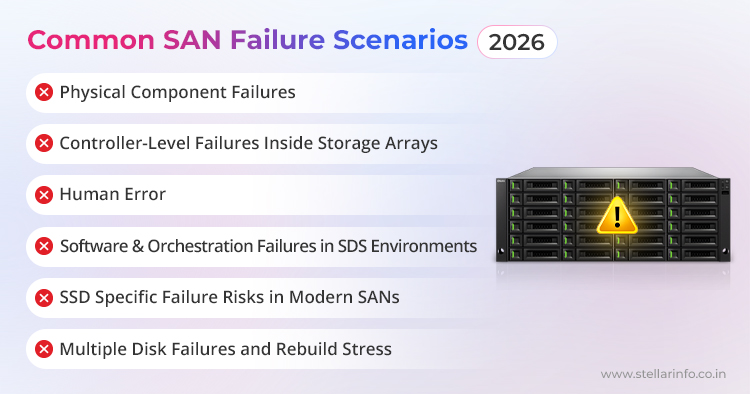
Common SAN Failure Scenarios in 2026
When your LUNs (Logical Unit Numbers) disappear, your first instinct might be to blame the drives. However, as experts in enterprise storage failure, we’ve seen that the root cause is often more nuanced. Here is a deep look at what is likely happening behind those error logs.
1. Physical Component Failures
Yes, hardware still fails. Even in 2026. But what’s changed is impact, not frequency.
Despite high MTBF ratings, we often find that there are system components in modern SAN design that eventually trigger SAN failure scenarios because of their vulnerabilities. These are:
- Host Bus Adapters (HBAs) at the server layer
- Fibre Channel or Ethernet transceivers (SFPs / QSFPs)
- Fibre cables with micro bends causing intermittent signal loss
- Power supplies or fans inside modular SAN switches
With 100 Gb and 200 Gb links, the fiber optic cables themselves are incredibly sensitive. A micro-bend (that is, a tiny kink in the cable) can cause enough light loss to trigger thousands of CRC (Cyclic Redundancy Check) errors.
We also regularly observe that SAN transceivers (those small modules that connect cables to switches) work under immense heat. If your cooling fails or you experience a minor power surge, these components can suffer “soft failures.” They don't die completely, but they start “flapping,” causing your multipathing software to constantly reroute traffic until the system finally gives up.
The critical realization is that in a modern SAN, a small physical failure can remove multiple logical paths at once. For example:
- One degraded HBA firmware bug can cause repeated path flapping.
- A marginal SFP can introduce CRC errors that look like controller instability.
- A single failed power module in a switch can degrade an entire fabric segment.
So while disks themselves may be healthy, the SAN behaves as if storage has vanished.
This is why SAN downtime causes are often misdiagnosed as “software problems” or “VM issues” even when the root cause is physical.
2. Controller-Level Failures Inside Storage Arrays
This is one of the most disruptive and misunderstood failure modes. Here’s why we say so.
A modern storage array is not just a box of flash or disk drives. It is more like a metadata driven system where controllers are supposed to manage:
- RAID or erasure coding logic
- Write caching and cache coherency
- LUN presentation and access control
- Snapshot and replication metadat
This means that the “controller” doesn’t have to be “dead” to cause a SAN failure. It might introduce a tiny glitch in the system, which can cause a failure.
That’s why more often, we see issues like:
- Controllers stuck in failover loops
- Cache desynchronization between controller pairs
- Firmware mismatches after partial upgrades
- Cache battery or persistent memory issues invalidating writes
When this happens, the disks in the SAN may all be present and healthy, but the SAN no longer knows how to assemble them correctly. That’s when LUNs go offline, flip to a read only state, or appear corrupted.
From the outside, this looks like LUN corruption. Internally, it’s metadata damage or an incomplete controller state.
This distinction matters enormously for SAN recovery, but it’s not obvious at the moment of failure.
3. Human Error
Despite automation, redundancy, and guardrails, human error remains the most common source of enterprise storage failure.
These are the two categories of human errors.
Zoning and Masking Errors:
You might have been performing routine maintenance and accidentally misconfigured a zone. In a SAN, “zoning” is like a gatekeeper that tells a server which storage it can see. If the gate closes, you face immediate LUN corruption symptoms where the volume is healthy but the server simply cannot “talk” to it.
The Configuration Ricochet:
In 2025, many SANs use orchestration scripts. A “fat-fingered” command in a script can propagate a configuration change across 50 switches in seconds, which leads to a total fabric collapse before you can react.
There are other human errors too, such as:
- Deleting or unmapping the wrong volume
- Applying firmware updates without compatibility validation
- Rolling back configurations partially in SDS environments
What makes the impact of all of these errors even worse today is automation. A single misapplied change can propagate across:
- Multiple fabrics
- Multiple hosts
- Dozens of data stores
4. Software & Orchestration Failures in SDS Environments
In modern SAN design, many failures originate in the orchestration layers that coordinate how data is stored, accessed, and protected.
Software-Defined Storage (SDS) is a storage architecture that separates storage software from its underlying hardware. This allows you to manage, allocate, and protect data using intelligent, policy-driven software rather than relying only on the built-in features of physical devices.
SDS relies on a constantly updated “map” (metadata) to keep track of where data chunks are stored across different “Lego bricks” of hardware. If the orchestration software crashes during a write, that map can become desynchronized. The data is there, but the software doesn't know how to put the pieces back together, effectively causing a RAID collapse at the logical level.
5. SSD Specific Failure Risks in Modern SANs
If you are using an All-Flash Storage Array, you are dealing with an inherent vulnerability of NAND flash memory. This introduces a unique failure risk called “floating gate inconsistency.”
Let’s break this down further.
SSDs use a technique called “overprovisioning,” which means that a portion of the storage is intentionally kept hidden from the operating system to extend the drive’s life and balance the wear across all flash cells. When data is deleted, the SSD’s controller is supposed to erase the relevant blocks and reset the tiny “floating gates” that store electrical charges (the basic units of NAND storage).
However, if there’s a firmware bug or unexpected power loss, the controller might incorrectly mark a block as erased even though the actual floating gates haven’t been reset. This creates a “pseudo-erase” state.
In this state, the system thinks a block is clean and ready for reuse. But in reality, it might still hold fragments of old data. Or the charge state is ambiguous, leading to unpredictable read errors.
When your SAN tries to access these blocks, you might see sudden NVMe-oF failure messages or experience a total loss of visibility to the affected LUN, what’s sometimes called a “Dark LUN.”
This failure mode can be difficult to detect and even harder to recover from because the problem is buried at the intersection of hardware and software.
6. Multiple Disk Failures and Rebuild Stress
Lastly, we still see the classic nightmare. When one high-capacity drive fails in a RAID group, the system begins a “rebuild.”
In today’s SANs, drives are so large that a rebuild can take hours or even days. This process puts immense read stress on the remaining drives. Consequently, if a second drive (often from the same manufacturing batch) fails during this window, you face a multiple disk failure scenario that results in a total RAID collapse.
These situations often result in SAN RAID failure scenarios that require professional reconstruction.
Impact of SAN Failure in Modern Enterprises
By the time a SAN failure becomes visible, the damage is rarely limited to storage. Because modern SANs sit beneath virtualization, databases, and clustered workloads, the impact of failure multiplies fast.
1. Infrastructure-Level Impact
When a SAN failure scenario occurs, the physical and logical layers of your data center face immediate destabilization. If you are running an NVMe-oF failure-prone environment, the loss of high-speed paths causes “path thrashing.” Your multipathing software will frantically attempt to reroute I/O to surviving ports. This can create a “CPU spike” on your host servers as they struggle to manage the overhead.
2. Operational Impact
The most visible symptom of a SAN outage is “operational gridlock.” In modern virtualized environments, the loss of a backend LUN causes an “All-Paths-Down” (APD) state. This triggers a “boot storm,” which is a phenomenon where thousands of virtual machines (VMs) or containers attempt to reboot simultaneously once connectivity comes back.
This surge in I/O requests can choke your fabric, which can overstress even a healthy controller and potentially cause a secondary crash.
3. Data Integrity Impact
Beyond immediate downtime lies the invisible danger of logical corruption. In modern SAN, many systems use synchronous replication to mirror data to secondary sites. If a software bug or LUN corruption occurs on the primary site, that corruption is mirrored to your Disaster Recovery (DR) site in real-time. You might find that your backup is just as “broken” as your production environment, which leaves you with no consistent point-in-time to revert to.
4. Business Impact
For enterprises in banking, energy, or e-commerce, an enterprise storage failure is a financial catastrophe. Statistics show that downtime costs now range between $500,000 and $1 million per hour, according to recent industry research on the true cost of downtime. Beyond the immediate revenue loss, you face severe SLA penalties, fines from regulatory bodies like the RBI or SEBI (in India), and long-term reputational damage that can take years to repair.
Why SAN Recovery Is Not the Same as Traditional Data Recovery
This is why enterprises rely on specialized providers like Stellar Data Recovery, where SAN recovery is performed using forensic reconstruction methods instead of generic software-based tools.
To minimize downtime, you might be tempted to use standard recovery tools, but we must warn you: SAN data recovery is nothing like data recovery from a single disk.
In a single hard drive, data is linear, but in a SAN, your data is fragmented across dozens or hundreds of flash modules using Erasure Coding (N+K) (a method that breaks data into fragments and expands it with redundant data pieces to protect against multiple failures).
So, to recover from LUN corruption, you need to reconstruct the “metadata map” that tells the system which block belongs to which file across the entire fabric. If you attempt a DIY fix or use “off-the-shelf” software, you risk overwriting these delicate pointers. In a high-density SAN storage environment, one wrong click can turn a recoverable situation into a permanent loss of petabytes.
How Stellar Performs SAN Data Recovery
When you ship your arrays or provide remote access to Stellar, we follow a rigorous, mathematically proven protocol designed to protect your data integrity at every step. Here’s how we handle your SAN storage recovery.
Phase 1: Forensic Triage
We begin by communicating directly with your team to understand the exact symptoms and chain of events. Did you see a controller failure? Was there a power surge? We analyze the logs from your Dell PowerStore, NetApp ASA, or HPE Alletra to map the failure's path.
Phase 2: Bit-Level Imaging
We never work on your original media. Our first step is to create bit-level clones of every single HDD, SSD, or NVMe module in our ISO-certified labs. We do this so that even if a drive is physically failing, we have a perfect digital copy to work from.
Phase 3: Virtual RAID Reconstruction
This is where the magic happens. We use proprietary tools to perform a virtual RAID reconstruction. We simulate your specific striping patterns and parity calculations in a virtual environment. This allows us to assemble your LUNs without writing a single bit to your original disks.
Phase 4: LUN and Volume Extraction
Once the virtual fabric is stable, we begin LUN recovery. Whether your data is trapped in a VMware VMFS datastore, a Windows NTFS volume, or a complex SQL database, we extract the data and move it to a secure, healthy environment.
Phase 5: Integrity Validation
We validate the data to ensure it is consistent and usable. We check for logical corruption and ensure that the rewind to your last known good state is successful.
We know the urgency you are feeling right now. Our goal is to take the guesswork out of your recovery and replace it with a clinical, transparent process.
If you’d like us to review your specific error logs or diagnostic bundles to provide an immediate assessment of your SAN's recoverability, contact us and we will bring our industry-leading SAN data recovery expertise to the table.
For a deeper understanding of related enterprise storage failures and recovery strategies, explore our detailed guides on RAID, NAS, and modern storage architectures below:
- RAID Server Crashes: Causes, Recovery Steps, & Expert Solutions by Stellar
- NAS RAID Failure: Early Warning Signs, Safe Data Recovery, & Best Practices
- RAID Array Failure Symptoms: Early Signs, Causes, and Safe First Steps
- SAN vs. NAS vs. DAS: Comparison of Storage Architectures
- RAID Controller Failure: Recover Your Data Without Reinitializing the Array


About The Author

Data Recovery Expert & Content Strategist